Fish Catch Data Set
Description: The Fish Catch data set contains measurements on 159 fish caught in the lake Laengelmavesi, Finland.
Usage: Data(fish)
Format: A data frame with 159 observations on the following 7 variables.
Weight: Weight of the fish (in grams)
Length1: Length from the nose to the beginning of the tail (in cm)
Length2: Length from the nose to the notch of the tail (in cm)
Length3: Length from the nose to the end of the tail (in cm)
Height: Maximal height as % of Length3
Width: Maximal width as % of Length3
Species: Represents the grouping structure: the 7 species are 1=Bream, 2=Whitewish, 3=Roach, 4=Parkki, 5=Smelt,
6=Pike, 7=Perch.
Details
The Fish Catch data set contains measurements on 159 fish caught in the lake Laengelmavesi, Finland. For the 159 fishes of 7 species the weight, length, height, and width were measured. Three different length measurements are recorded: from the nose of the fish to the beginning of its tail, from the nose to the notch of its tail and from the nose to the end of its tail. The height and width are calculated as percentages of the third length variable. This results in 6 observed variables, Weight, Length1, Length2, Length3, Height, Width. Observation 14 has a missing value in variable Weight, therefore this observation is usually excluded from the analysis. The last variable, Species, represents the grouping structure: the 7 species are 1=Bream, 2=Whitewish, 3=Roach, 4=Parkki, 5=Smelt, 6=Pike, 7=Perch. This data set was also analyzed in the context of robust Linear Discriminant Analysis by Todorov (2007), Todorov and Pires (2007).
Source:
Journal of Statistical Education, Fish Catch Data Set, [http://www.amstat.org/publications/jse/datasets/fishcatch.txt] accessed August, 2006.
References:
Todorov, V. (2007 Robust selection of variables in linear discriminant analysis, Statistical Methods and Applications, 15, 395–407, doi:10.1007/s10260-006-0032-6.
Todorov, V. and Pires, A.M. (2007) Comparative performance of several robust linear discriminant analysis methods, REVSTAT Statistical Journal, 5, 63–83.
import pyreadr

orderedDict = pyreadr.read_r('fish.rda')
# Data:        https://github.com/valentint/rrcov/blob/master/data/fish.rda
# Definitions: https://search.r-project.org/CRAN/refmans/rrcov/html/fish.html

print(orderedDict)
OrderedDict([('fish',           Weight  Length1  Length2  Length3  Height  Width  Species
rownames
1          242.0     23.2     25.4     30.0    38.4   13.4        1
2          290.0     24.0     26.3     31.2    40.0   13.8        1
3          340.0     23.9     26.5     31.1    39.8   15.1        1
4          363.0     26.3     29.0     33.5    38.0   13.3        1
5          430.0     26.5     29.0     34.0    36.6   15.1        1
...          ...      ...      ...      ...     ...    ...      ...
155       1100.0     39.0     42.0     44.6    28.7   15.4        7
156       1000.0     39.8     43.0     45.2    26.4   16.1        7
157       1100.0     40.1     43.0     45.5    27.5   16.3        7
158       1000.0     40.2     43.5     46.0    27.4   17.7        7
159       1000.0     41.1     44.0     46.6    26.8   16.3        7

[159 rows x 7 columns])])
import pandas as pd

# df = pd.DataFrame(orderedDict, columns=orderedDict, index=[0])

df = pd.DataFrame() #init empty df

for k,v in orderedDict.items():
    print(v.head())
    df = pd.concat([df, v])

# https://stackoverflow.com/questions/44365209/generate-a-pandas-dataframe-from-ordereddict
          Weight  Length1  Length2  Length3  Height  Width  Species
rownames
1          242.0     23.2     25.4     30.0    38.4   13.4        1
2          290.0     24.0     26.3     31.2    40.0   13.8        1
3          340.0     23.9     26.5     31.1    39.8   15.1        1
4          363.0     26.3     29.0     33.5    38.0   13.3        1
5          430.0     26.5     29.0     34.0    36.6   15.1        1
print(df)
          Weight  Length1  Length2  Length3  Height  Width  Species
rownames
1          242.0     23.2     25.4     30.0    38.4   13.4        1
2          290.0     24.0     26.3     31.2    40.0   13.8        1
3          340.0     23.9     26.5     31.1    39.8   15.1        1
4          363.0     26.3     29.0     33.5    38.0   13.3        1
5          430.0     26.5     29.0     34.0    36.6   15.1        1
...          ...      ...      ...      ...     ...    ...      ...
155       1100.0     39.0     42.0     44.6    28.7   15.4        7
156       1000.0     39.8     43.0     45.2    26.4   16.1        7
157       1100.0     40.1     43.0     45.5    27.5   16.3        7
158       1000.0     40.2     43.5     46.0    27.4   17.7        7
159       1000.0     41.1     44.0     46.6    26.8   16.3        7

[159 rows x 7 columns]
SpeciesDict = {1:'Bream', 2:'Whitewish', 3:'Roach', 4:'Parkki', 5:'Smelt',
         6:'Pike', 7:'Perch'}

df = df.rename(columns={'Weight':'mass_g',
                        'Length1':'length_cm',
                        'Length2':'Length2',
                        'Length3':'Length3',
                        'Height':'Height',
                        'Width':'Width',
                        'Species':'SpeciesCd'})

df['species'] = df['SpeciesCd'].map(SpeciesDict)

fish = df[df['SpeciesCd'].isin([1,3,6,7])]
print(fish.iloc[:14])
          mass_g  length_cm  Length2  Length3  Height  Width  SpeciesCd  \
rownames
1          242.0       23.2     25.4     30.0    38.4   13.4          1
2          290.0       24.0     26.3     31.2    40.0   13.8          1
3          340.0       23.9     26.5     31.1    39.8   15.1          1
4          363.0       26.3     29.0     33.5    38.0   13.3          1
5          430.0       26.5     29.0     34.0    36.6   15.1          1
6          450.0       26.8     29.7     34.7    39.2   14.2          1
7          500.0       26.8     29.7     34.5    41.1   15.3          1
8          390.0       27.6     30.0     35.0    36.2   13.4          1
9          450.0       27.6     30.0     35.1    39.9   13.8          1
10         500.0       28.5     30.7     36.2    39.3   13.7          1
11         475.0       28.4     31.0     36.2    39.4   14.1          1
12         500.0       28.7     31.0     36.2    39.7   13.3          1
13         500.0       29.1     31.5     36.4    37.8   12.0          1
14           NaN       29.5     32.0     37.3    37.3   13.6          1

         species
rownames
1          Bream
2          Bream
3          Bream
4          Bream
5          Bream
6          Bream
7          Bream
8          Bream
9          Bream
10         Bream
11         Bream
12         Bream
13         Bream
14         Bream
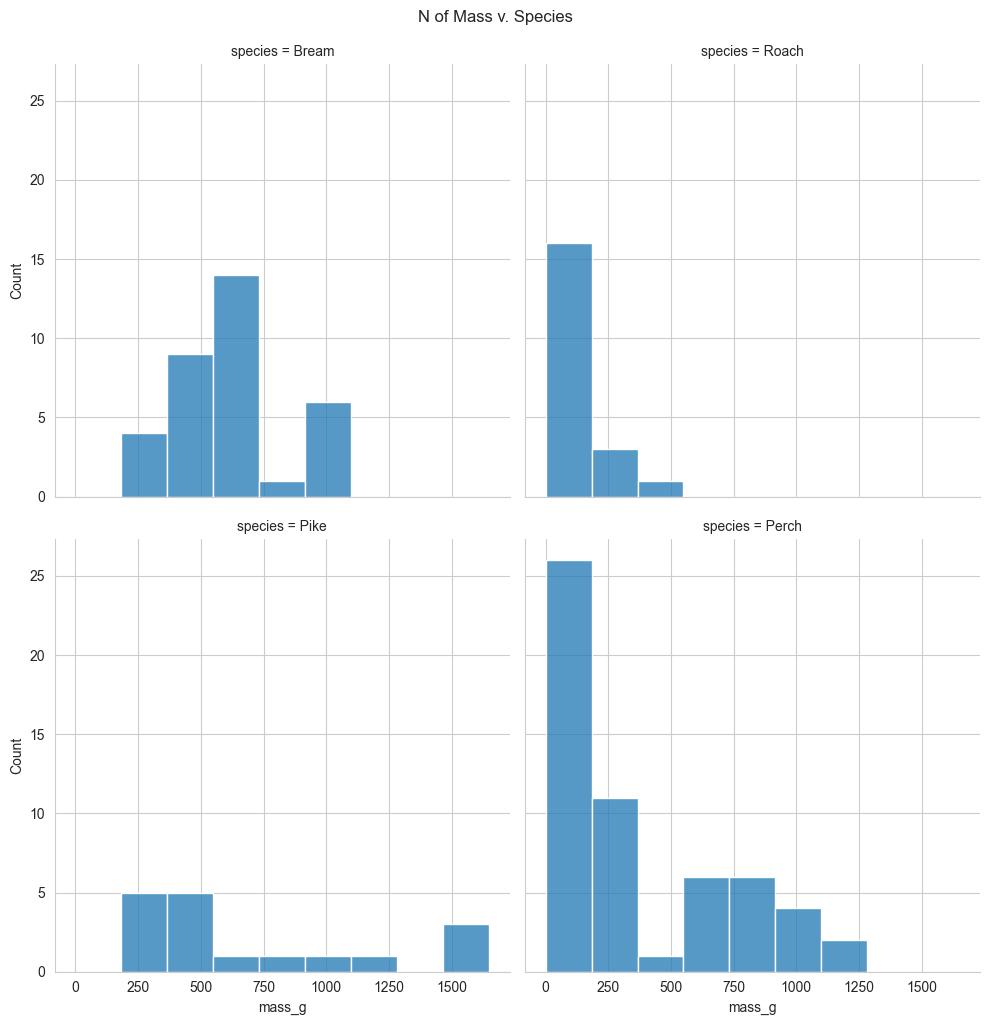
Visualizing 1 numeric and 1 categorical variable
To visualize the data, scatter plots aren’t ideal because species is categorical. Instead, we can draw a histogram for each of the species. To give a separate panel to each species, we use seaborn’s displot function. This takes a DataFrame as the data argument, the variable of interest as x, and the variable you want to split on as col. It also takes an optional col_wrap argument to specify the number of plots per row. Because the dataset is fairly small, we also set the bins argument to nine. By default, displot creates histograms.
import numpy as np
import matplotlib.pyplot as plt
import seaborn as sns

plt.rcParams['figure.figsize'] = (18,12)

sns.set_style('whitegrid')

sns.displot( data=fish
            ,col_wrap=2
            ,bins=9
            ,kind='hist'
            ,x='mass_g'
            ,col='species')

plt.suptitle('N of Mass v. Species', y=1.02)
plt.show()
Summary statistics: mean mass by species
Let’s calculate some summary statistics. First we group by species, then we calculate their mean masses. You can see that the mean mass of a bream is six hundred and eighteen grams. The mean mass for a perch is three hundred and eighty two grams, and so on.
summary_stats = fish.groupby('species')['mass_g'].mean()
print(summary_stats)
species
Bream    626.000000
Perch    382.239286
Pike     718.705882
Roach    152.050000
Name: mass_g, dtype: float64
Linear regression
Let’s run a linear regression using mass as the response variable and species as the explanatory variable. The syntax is the same: you call ols(), passing a formula with the response variable on the left and the explanatory variable on the right, and setting the data argument to the DataFrame. We fit the model using the fit method, and retrieve the parameters using dot params on the fitted model. This time we have four coefficients: an intercept, and one for three of the fish species. A coefficient for bream is missing, but the number for the intercept looks familiar. The intercept is the mean mass of the bream that you just calculated. You might wonder what the other coefficients are, and why perch has a negative coefficient, since fish masses can’t be negative.
from statsmodels.formula.api import ols
mdl_mass_v_species = ols('mass_g ~ species',data=fish).fit()
print(mdl_mass_v_species.params)
Intercept           626.000000
species[T.Perch]   -243.760714
species[T.Pike]      92.705882
species[T.Roach]   -473.950000
dtype: float64
Model with or without an intercept
The coefficients for each category are calculated relative to the intercept. This way of displaying results can be useful for models with multiple explanatory variables, but for simple linear regression, it’s just confusing. Fortunately, we can fix it. By changing the formula slightly to append “plus zero”, we specify that all the coefficients should be given relative to zero. Equivalently, it means we are fitting a linear regression without an intercept term. If you subtract two hundred and thirty five point fifty-nine from six hundred and seventeen point eighty-three, you get three hundred and eighty two point twenty four, which is the mean mass of a perch.
Now these coefficients make more sense. They are all just the mean masses for each species. This is a reassuringly boring result. When you only have a single, categorical explanatory variable, the linear regression coefficients are simply the means of each category.
mdl_mass_v_species = ols('mass_g ~ species + 0',data=fish).fit()
print(mdl_mass_v_species.params)
species[Bream]    626.000000
species[Perch]    382.239286
species[Pike]     718.705882
species[Roach]    152.050000
dtype: float64
The fish dataset: bream
Here’s the fish dataset again. This time, we’ll look only at the bream data. There’s a new explanatory variable too: the length of each fish, which we’ll use to predict the mass of the fish.
bream = fish[fish['species'] == 'Bream']
print(bream.head())
          mass_g  length_cm  Length2  Length3  Height  Width  SpeciesCd  \
rownames
1          242.0       23.2     25.4     30.0    38.4   13.4          1
2          290.0       24.0     26.3     31.2    40.0   13.8          1
3          340.0       23.9     26.5     31.1    39.8   15.1          1
4          363.0       26.3     29.0     33.5    38.0   13.3          1
5          430.0       26.5     29.0     34.0    36.6   15.1          1

         species
rownames
1          Bream
2          Bream
3          Bream
4          Bream
5          Bream
Plotting mass vs. length
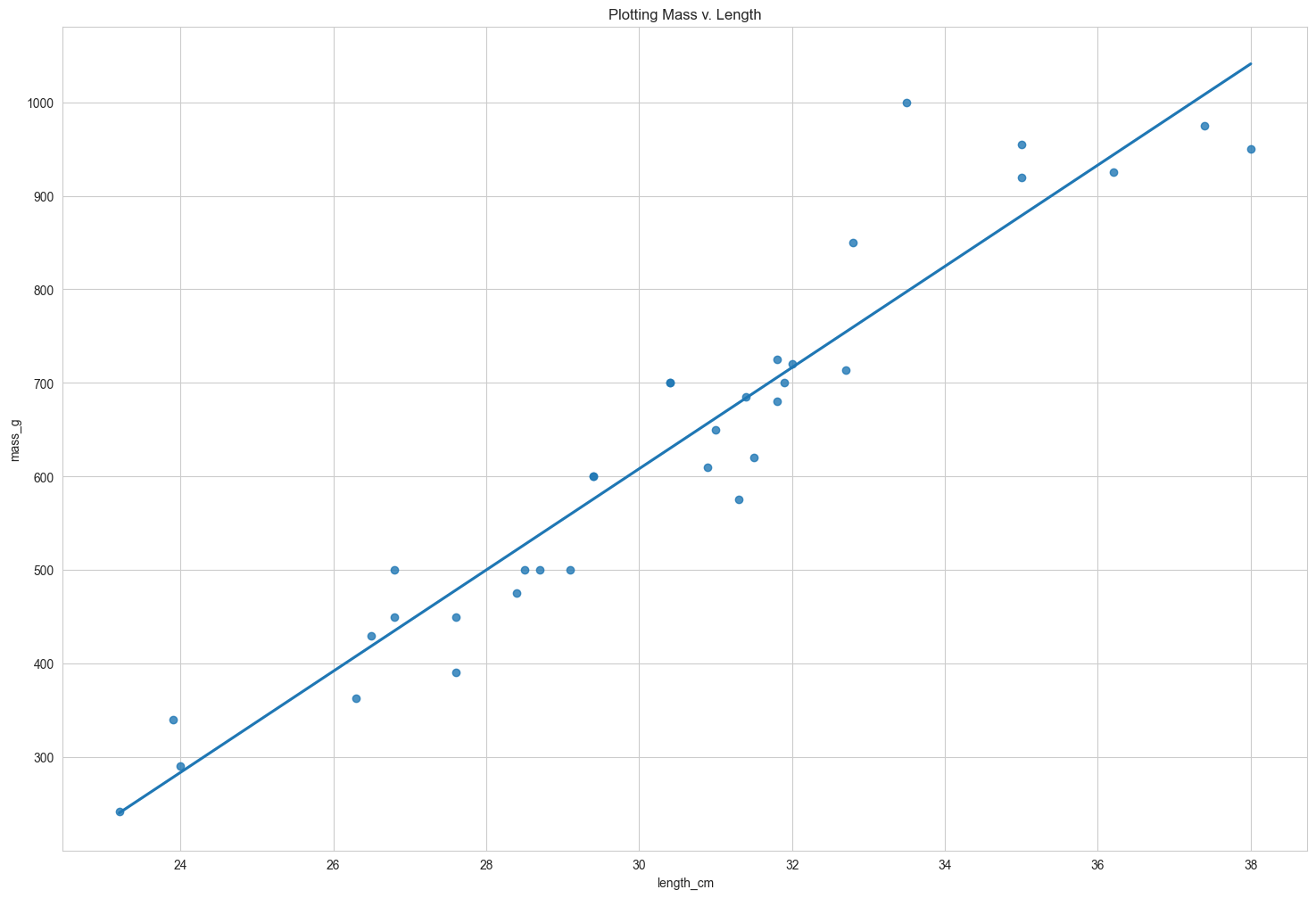
Here’s a scatter plot of mass versus length for the bream data, with a linear trend line.
sns.regplot(data=bream
               ,y='mass_g'
               ,x='length_cm'
               ,ci=None)

plt.title('Plotting Mass v. Length')
plt.show()
Running the model
Before we can make predictions, we need a fitted model. As before, we call ols() with a formula and the dataset, after which we add .fit(). The response, mass in grams, goes on the left-hand side of the formula, and the explanatory variable, length in centimeters, goes on the right. We need to assign the result to a variable to reuse later on. To view the coefficients of the model, we use the params attribute in a print() call.
mdl_mass_v_len = ols('mass_g ~ length_cm', data=bream).fit()
mdl_bream = ols('mass_g ~ length_cm', data=bream).fit()
print(mdl_mass_v_len.params)
Intercept   -1015.049819
length_cm      54.107539
dtype: float64
Data on explanatory values to predict
The principle behind predicting is to ask questions of the form “if I set the explanatory variables to these values, what value would the response variable have?”. That means that the next step is to choose some values for the explanatory variables. To create new explanatory data, we need to store our explanatory variables of choice in a pandas DataFrame. You can use a dictionary to specify the columns. For this model, the only explanatory variable is the length of the fish. You can specify an interval of values using the np dot arange function, taking the start and end of the interval as arguments. Notice that the end of the interval does not include this value. Here, we specified a range of twenty to forty centimeters.
explanatory_data = pd.DataFrame({"length_cm":np.arange(20,41)})
print(explanatory_data.head())
   length_cm
0         20
1         21
2         22
3         23
4         24
Call predict()
The next step is to call predict on the model, passing the DataFrame of explanatory variables as the argument. The predict function returns a Series of predictions, one for each row of the explanatory data.
prediction = mdl_mass_v_len.predict(explanatory_data)
print(prediction.head())
0     67.100954
1    121.208492
2    175.316031
3    229.423570
4    283.531108
dtype: float64
Predicting inside a DataFrame
Having a single column of predictions isn’t that helpful to work with. It’s easier to work with if the predictions are in a DataFrame alongside the explanatory variables. To do this, you can use the pandas assign() method. It returns a new object with all original columns in addition to new ones. You start with the existing column, explanatory_data. Then, you use .assign() to add a new column, named after the response variable, mass_g. You calculate it with the same predict code from the previous slide. The resulting DataFrame contains both the explanatory variable and the predicted response. Now we can answer questions like “how heavy would we expect a bream with length twenty three centimeters to be?”, even though the original dataset didn’t include a bream of that exact length. Looking at the prediction data, you can see that the predicted mass is 229 grams.
predicted_response_data = explanatory_data.assign(mass_g=prediction)
print(predicted_response_data.head())
   length_cm      mass_g
0         20   67.100954
1         21  121.208492
2         22  175.316031
3         23  229.423570
4         24  283.531108
Showing predictions
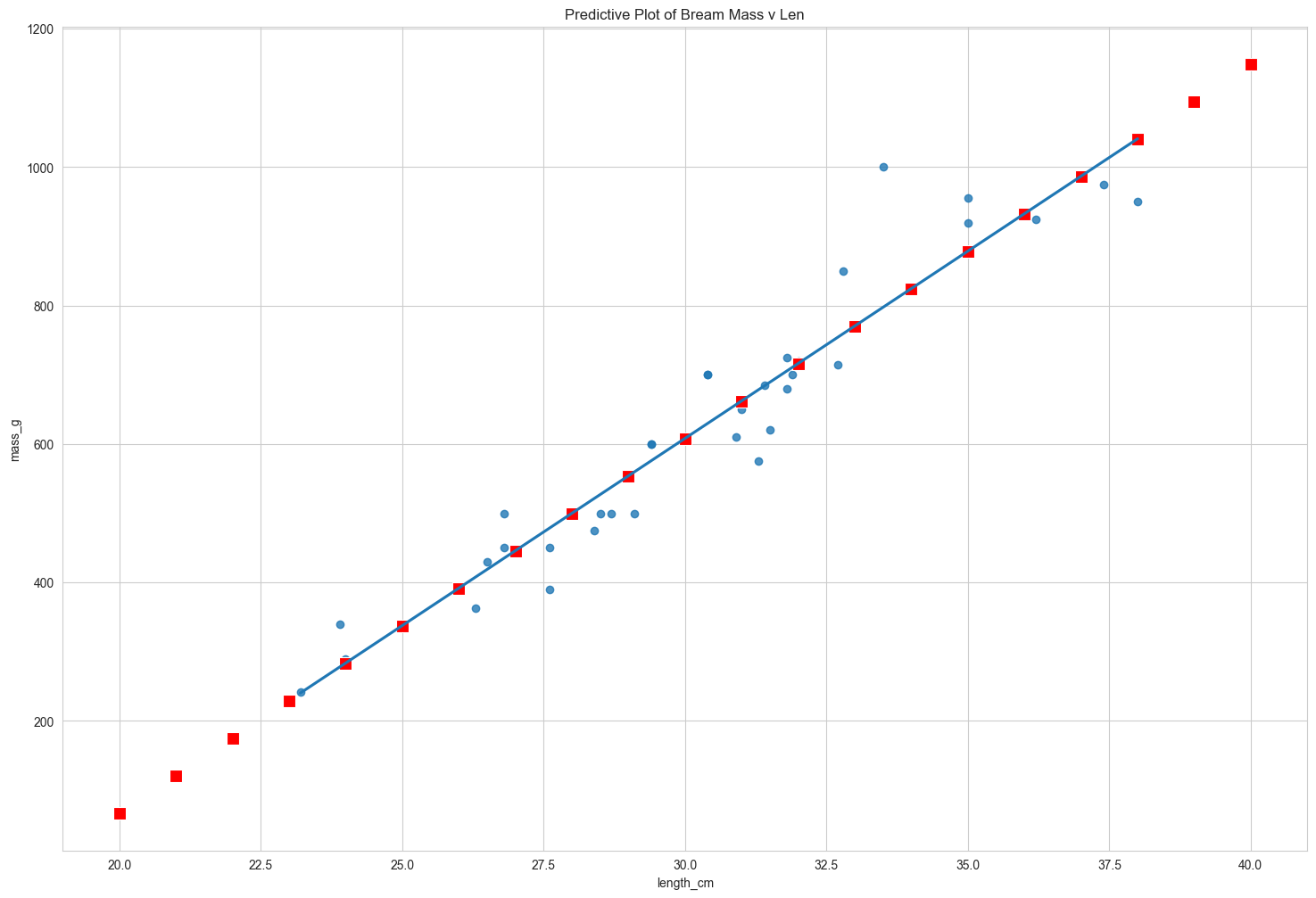
Let’s include the predictions we just made on the scatter plot. To plot multiple layers, we set a matplotlib figure object called fig before calling regplot and scatterplot. As a result, the plt dot show call will then plot both graphs on the same figure. I’ve marked the prediction points in red squares to distinguish them from the actual data points. Notice that the predictions lie exactly on the trend line.
fig = plt.figure()
sns.regplot(data=bream
           ,y='mass_g'
           ,x='length_cm'
           ,ci=None)
sns.scatterplot(data=predicted_response_data
               ,y='mass_g'
               ,x='length_cm'
               ,color='red'
               ,marker='s'
               ,s=100)
plt.title('Predictive Plot of Bream Mass v Len')
plt.show()
Extrapolating
All the fish were between twenty three and thirty eight centimeters, but the linear model allows us to make predictions outside that range. This is called extrapolating. Let’s see what prediction we get for a ten centimeter bream. To achieve this, you first create a DataFrame with a single observation of 10 cm. You then predict the corresponding mass as before. Wow. The predicted mass is almost minus five hundred grams! This is obviously not physically possible, so the model performs poorly here. Extrapolation is sometimes appropriate, but can lead to misleading or ridiculous results. You need to understand the context of your data in order to determine whether it is sensible to extrapolate.
lil_bream_data = pd.DataFrame({'length_cm':[10]})
lil_bream_prediction = mdl_mass_v_len.predict(lil_bream_data)
lil_bream_prediction_data = lil_bream_data.assign(mass_g = lil_bream_prediction)
print(lil_bream_prediction_data)
   length_cm      mass_g
0         10 -473.974433
fig = plt.figure()
sns.regplot(data=bream
           ,y='mass_g'
           ,x='length_cm'
           ,ci=None)
sns.scatterplot(data=lil_bream_prediction_data
               ,y='mass_g'
               ,x='length_cm'
               ,color='red'
               ,marker='s'
               ,s=250)

plt.title('Mass v Extrapolative Plot of Bream Length')
plt.show()

Working with model objects & the .params attribute
We already learned how to extract the coefficients or parameters from your fitted model. We add the dot params attribute, which will return a pandas Series including your intercept and slope.
from statsmodels.formula.api import ols
mdl_mass_vs_length = ols('mass_g ~ length_cm', data = bream).fit()
print(mdl_mass_vs_length.params)
Intercept   -1015.049819
length_cm      54.107539
dtype: float64
.fittedvalues attribute
“Fitted values” is jargon for predictions on the original dataset used to create the model. We access them with the fittedvalues attribute. The result is a pandas Series of length thirty five, which is the number of rows in the bream dataset. The fittedvalues attribute is essentially a shortcut for taking the explanatory variable columns from the dataset, then feeding them to the predict function.
mdl_fitted = pd.DataFrame()
mdl_fitted['fittedval'] = mdl_mass_vs_length.fittedvalues

explanatory_data = bream['length_cm']
mdl_fitted['predicted_explanatory_data'] = mdl_mass_vs_length.predict(explanatory_data)
print(mdl_fitted)
            fittedval  predicted_explanatory_data
rownames
1          240.245077                  240.245077
2          283.531108                  283.531108
3          278.120354                  278.120354
4          407.978447                  407.978447
5          418.799955                  418.799955
6          435.032217                  435.032217
7          435.032217                  435.032217
8          478.318247                  478.318247
9          478.318247                  478.318247
10         527.015032                  527.015032
11         521.604278                  521.604278
12         537.836540                  537.836540
13         559.479555                  559.479555
15         575.711817                  575.711817
16         575.711817                  575.711817
17         629.819356                  629.819356
18         629.819356                  629.819356
19         656.873125                  656.873125
20         662.283879                  662.283879
21         678.516140                  678.516140
22         683.926894                  683.926894
23         689.337648                  689.337648
24         705.569910                  705.569910
25         710.980664                  710.980664
26         705.569910                  705.569910
27         716.391418                  716.391418
28         754.266695                  754.266695
29         759.677448                  759.677448
30         797.552725                  797.552725
31         878.714033                  878.714033
32         878.714033                  878.714033
33         943.643080                  943.643080
34        1008.572126                 1008.572126
35        1041.036649                 1041.036649
.resid attribute
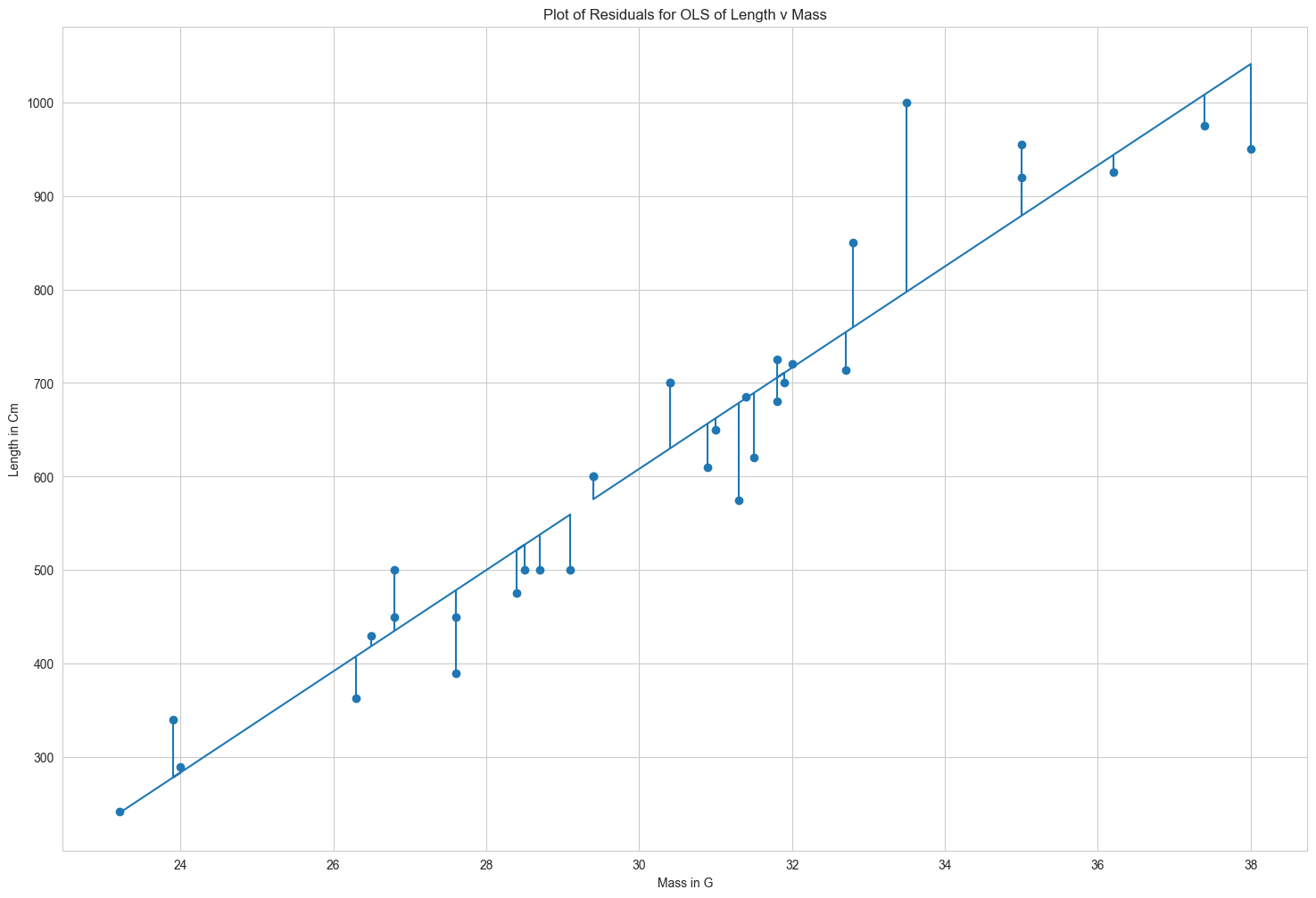
“Residuals” are a measure of inaccuracy in the model fit, and are accessed with the resid attribute. Like fitted values, there is one residual for each row of the dataset. Each residual is the actual response value minus the predicted response value. In this case, the residuals are the masses of breams, minus the fitted values. We illustrated the residuals as red lines on the regression plot. Each vertical line represents a single residual. We’ll see more on how to use the fitted values and residuals to assess the quality of your model later.
residuals = pd.DataFrame()

residuals['mdl_resi'] = mdl_mass_vs_length.resid

response_data = bream['mass_g']
residuals['mdl_minus_fitted'] = response_data - mdl_mass_vs_length.fittedvalues

print(residuals)
            mdl_resi  mdl_minus_fitted
rownames
1           1.754923          1.754923
2           6.468892          6.468892
3          61.879646         61.879646
4         -44.978447        -44.978447
5          11.200045         11.200045
6          14.967783         14.967783
7          64.967783         64.967783
8         -88.318247        -88.318247
9         -28.318247        -28.318247
10        -27.015032        -27.015032
11        -46.604278        -46.604278
12        -37.836540        -37.836540
13        -59.479555        -59.479555
15         24.288183         24.288183
16         24.288183         24.288183
17         70.180644         70.180644
18         70.180644         70.180644
19        -46.873125        -46.873125
20        -12.283879        -12.283879
21       -103.516140       -103.516140
22          1.073106          1.073106
23        -69.337648        -69.337648
24        -25.569910        -25.569910
25        -10.980664        -10.980664
26         19.430090         19.430090
27          3.608582          3.608582
28        -40.266695        -40.266695
29         90.322552         90.322552
30        202.447275        202.447275
31         41.285967         41.285967
32         76.285967         76.285967
33        -18.643080        -18.643080
34        -33.572126        -33.572126
35        -91.036649        -91.036649
# Graph Residuals
# reference: https://stackoverflow.com/questions/51220918/python-plot-residuals-on-a-fitted-model

df = pd.DataFrame()

df['length_cm'] = explanatory_data
df['fitted_values'] = mdl_mass_vs_length.fittedvalues
df['residuals'] = mdl_mass_vs_length.resid

x = df['length_cm']
y = df['fitted_values']
dy = df['residuals']

fig, ax = plt.subplots()
ax.plot(x,y)
ax.scatter(x,y+dy)

ax.vlines(x,y,y+dy)

plt.ylabel('Length in Cm')
plt.xlabel('Mass in G')
plt.title('Plot of Residuals for OLS of Length v Mass')
plt.show()
.summary() method
The summary method shows a more extended printout of the details of the model. Let’s step through this piece by piece.
mdl_mass_vs_length.summary()
| Dep. Variable: | mass_g | R-squared: | 0.911 |
|---|---|---|---|
| Model: | OLS | Adj. R-squared: | 0.908 |
| Method: | Least Squares | F-statistic: | 328.4 |
| Date: | Mon, 23 Oct 2023 | Prob (F-statistic): | 2.18e-18 |
| Time: | 20:33:20 | Log-Likelihood: | -187.82 |
| No. Observations: | 34 | AIC: | 379.6 |
| Df Residuals: | 32 | BIC: | 382.7 |
| Df Model: | 1 | ||
| Covariance Type: | nonrobust |
| coef | std err | t | P>|t| | [0.025 | 0.975] | |
|---|---|---|---|---|---|---|
| Intercept | -1015.0498 | 91.184 | -11.132 | 0.000 | -1200.786 | -829.314 |
| length_cm | 54.1075 | 2.986 | 18.123 | 0.000 | 48.026 | 60.189 |
| Omnibus: | 9.859 | Durbin-Watson: | 1.368 |
|---|---|---|---|
| Prob(Omnibus): | 0.007 | Jarque-Bera (JB): | 9.210 |
| Skew: | 0.946 | Prob(JB): | 0.0100 |
| Kurtosis: | 4.709 | Cond. No. | 260. |
Notes:
[1] Standard Errors assume that the covariance matrix of the errors is correctly specified.
First, we see the dependent variable(s) that were used in the model, in addition to the type of regression. We also see some metrics on the performance of the model. These will be discussed later.
In the second part of the summary, we see details of the coefficients. The numbers in the first column (coef) are the ones contained in the params attribute. The numbers in the fourth column P>|t| are the p-values, which refer to statistical significance.
Transforming variables
Sometimes, the relationship between the explanatory variable and the response variable may not be a straight line. To fit a linear regression model, you may need to transform the explanatory variable or the response variable, or both of them.
Perch dataset
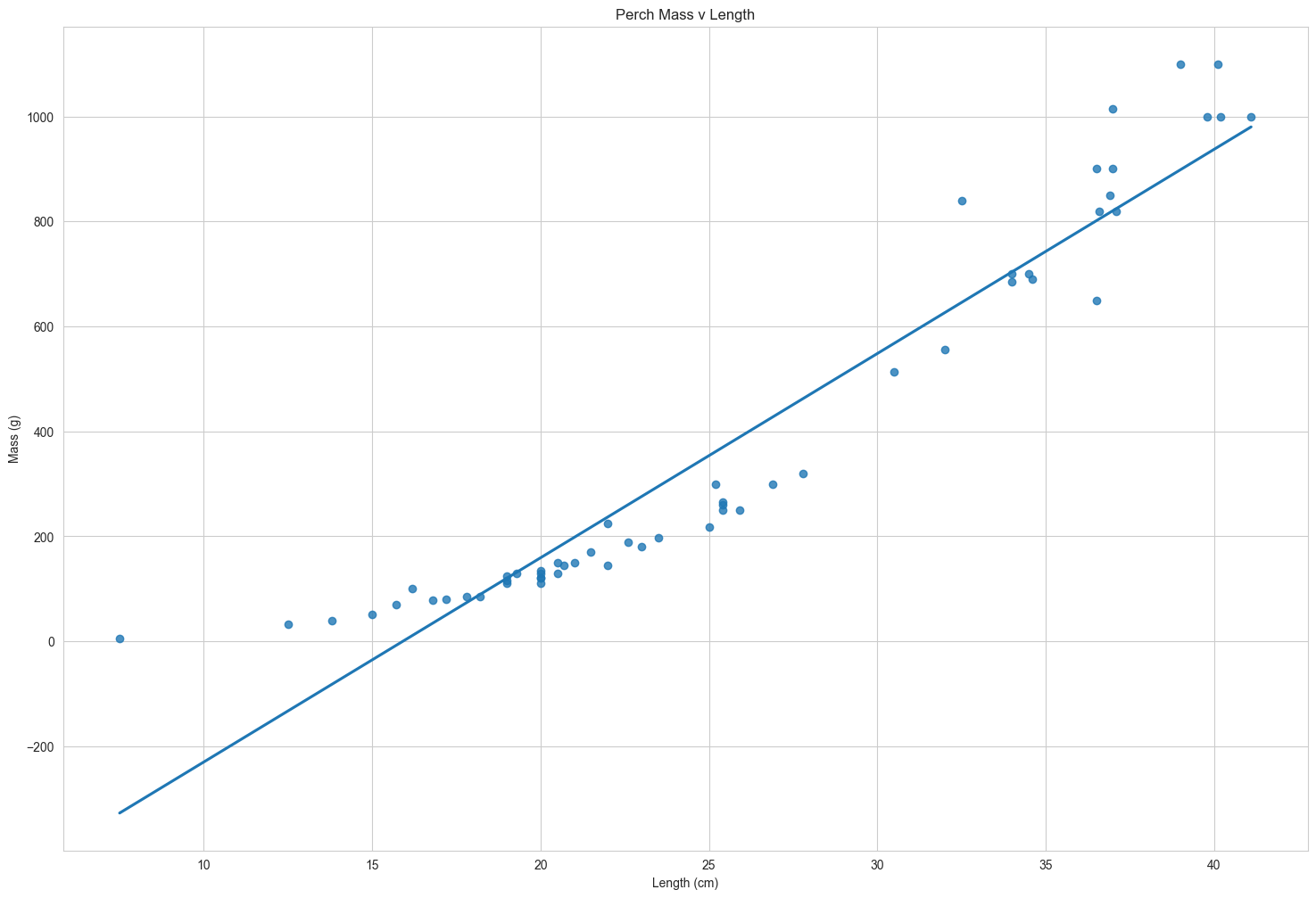
Consider the perch in the fish dataset.
It’s not a linear relationship
The upward curve in the mass versus length data prevents us drawing a straight line that follows it closely.
perch = fish[fish['species']=='Perch']

print(perch.head())
          mass_g  length_cm  Length2  Length3  Height  Width  SpeciesCd  \
rownames
104          5.9        7.5      8.4      8.8    24.0   16.0          7
105         32.0       12.5     13.7     14.7    24.0   13.6          7
106         40.0       13.8     15.0     16.0    23.9   15.2          7
107         51.5       15.0     16.2     17.2    26.7   15.3          7
108         70.0       15.7     17.4     18.5    24.8   15.9          7

         species
rownames
104        Perch
105        Perch
106        Perch
107        Perch
108        Perch
sns.regplot(x='length_cm'
           ,y='mass_g'
           ,data=perch
           ,ci=None)

plt.ylabel('Mass (g)')
plt.xlabel('Length (cm)')
plt.title('Perch Mass v Length')
plt.show()
Bream vs. perch
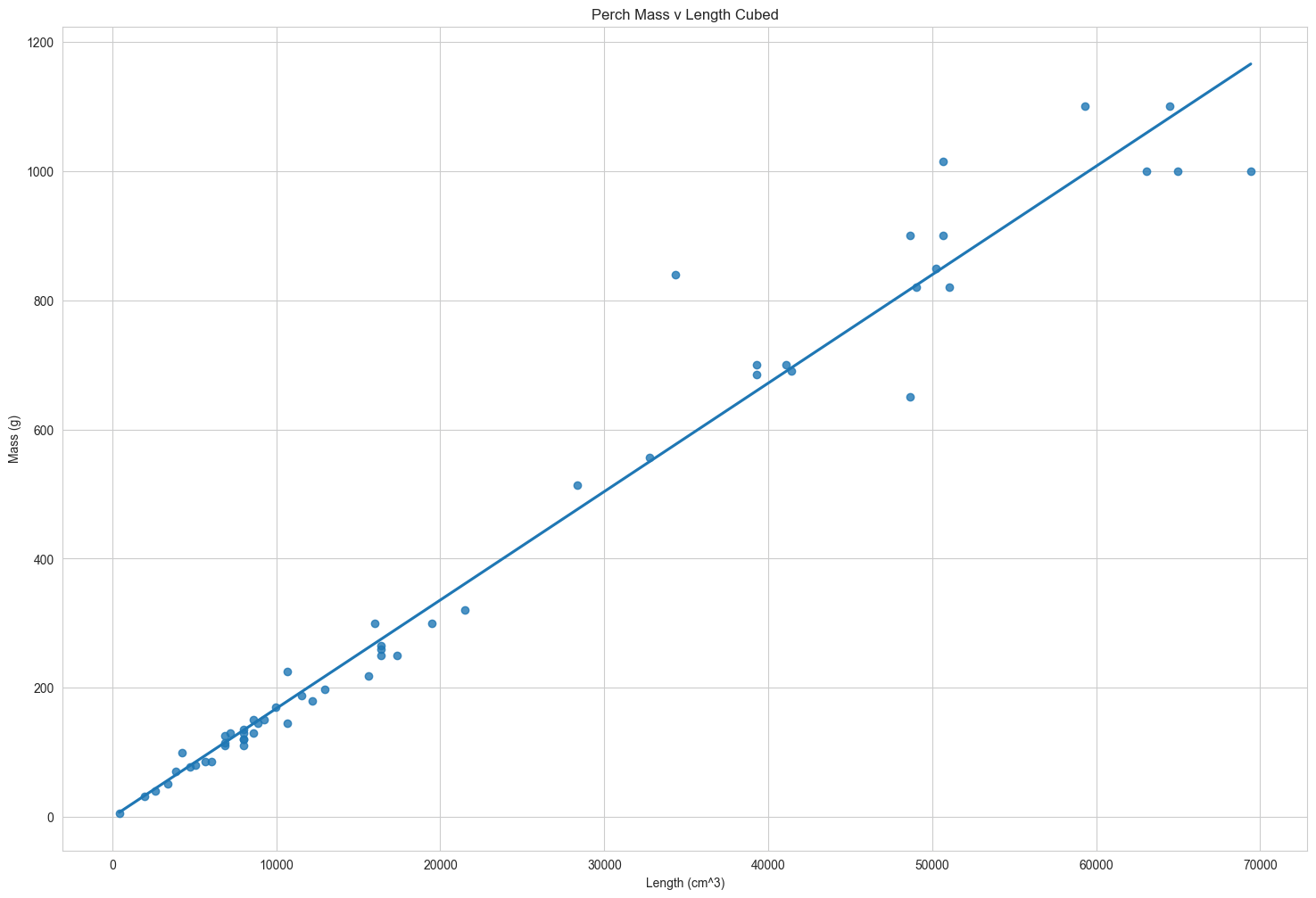
To understand why the bream had a strong linear relationship between mass and length, but the perch didn’t, you need to understand your data. I’m not a fish expert, but looking at the picture of the bream on the left, it has a very narrow body. I guess that as bream get bigger, they mostly get longer and not wider. By contrast, the perch on the right has a round body, so I guess that as it grows, it gets fatter and taller as well as longer. Since the perches are growing in three directions at once, maybe the length cubed will give a better fit.

Plotting mass vs. length cubed
Here’s an update to the previous plot. The only change is that the x-axis is now length to the power of three. To do this, first create an additional column where you calculate the length cubed. Then replace this newly created column in your regplot call. The data points fit the line much better now, so we’re ready to run a model.
perch['length_cm_cubed'] = perch['length_cm'] ** 3
/var/folders/qh/8n85f6ts44s2bcxhlgv5k02c0000gn/T/ipykernel_7193/3381336321.py:1: SettingWithCopyWarning:
A value is trying to be set on a copy of a slice from a DataFrame.
Try using .loc[row_indexer,col_indexer] = value instead

See the caveats in the documentation: https://pandas.pydata.org/pandas-docs/stable/user_guide/indexing.html#returning-a-view-versus-a-copy
  perch['length_cm_cubed'] = perch['length_cm'] ** 3
sns.regplot(x='length_cm_cubed'
           ,y='mass_g'
           ,data=c
           ,ci=None)

plt.ylabel('Mass (g)')
plt.xlabel('Length (cm^3)')
plt.title('Perch Mass v Length Cubed')
plt.show()
Modeling mass vs. length cubed
To model this transformation, we replace the original length variable with the cubed length variable. We then fit the model and extract its coefficients.
mdl_perch = ols('mass_g ~ length_cm_cubed', data = perch).fit()

print(mdl_perch.params)
Intercept         -0.117478
length_cm_cubed    0.016796
dtype: float64
Predicting mass vs. length cubed
We create the explanatory DataFrame in the same way as usual. Notice that you specify the lengths cubed. We can also add the untransformed lengths column for reference. The code for adding predictions is the same assign and predict combination as you’ve seen before.
import numpy as np

explanatory_perch_data = pd.DataFrame({'length_cm' : np.arange(10,41,5)
                                      ,'length_cm_cubed' : np.arange(10,41,5) ** 3})

predicted_response = mdl_perch.predict(explanatory_perch_data)

prediction_data = explanatory_perch_data.assign(mass_g = predicted_response)

print(prediction_data.head())
   length_cm  length_cm_cubed      mass_g
0         10             1000   16.678135
1         15             3375   56.567717
2         20             8000  134.247429
3         25            15625  262.313982
4         30            27000  453.364084
Plotting mass vs. length cubed (1/2)
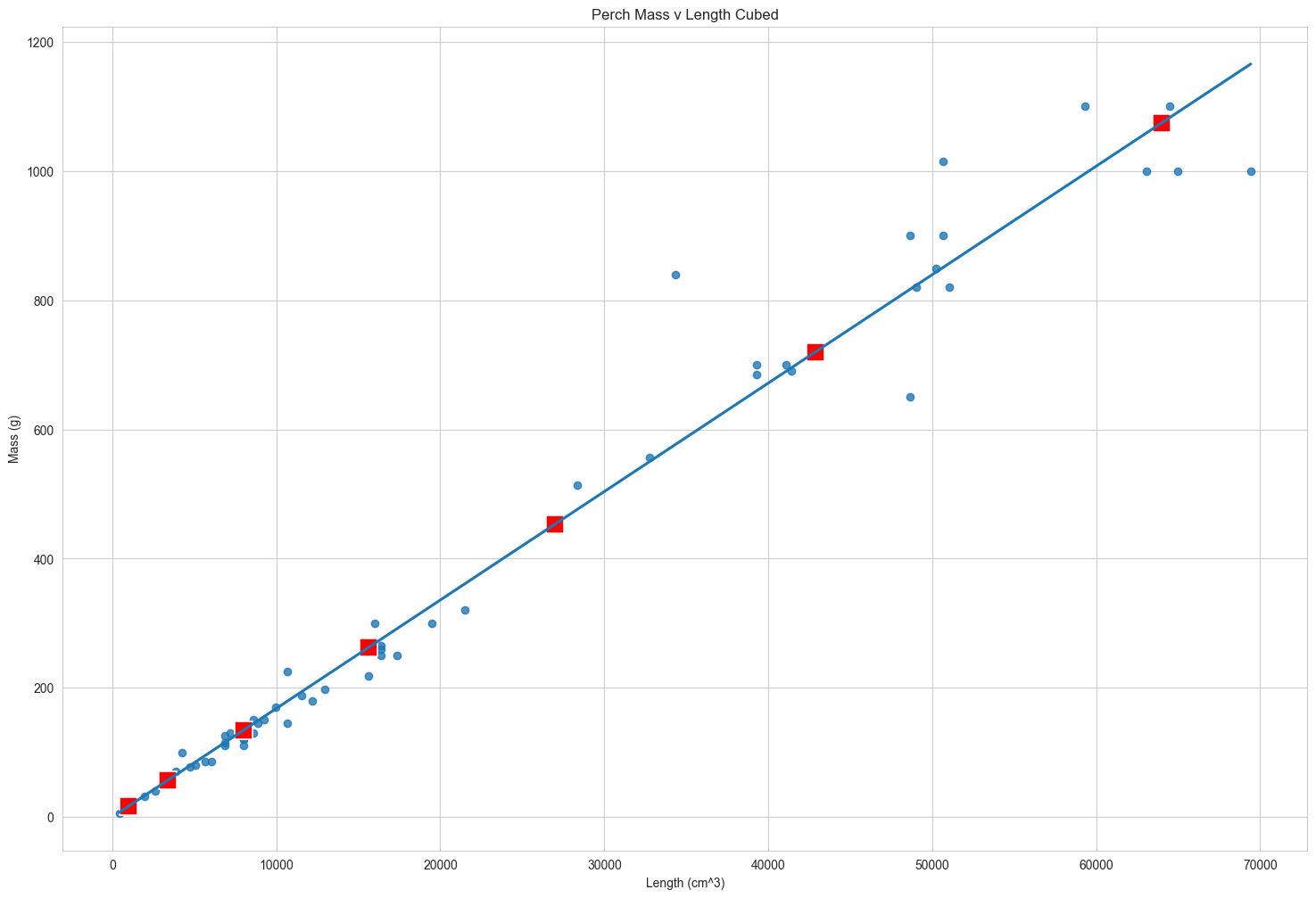
The predictions have been added to the plot of mass versus length cubed as red points. As you might expect, they follow the line drawn by regplot.
fig = plt.figure()

sns.regplot(x = 'length_cm_cubed'
           ,y = 'mass_g'
           ,data = perch
           ,ci = None
           )

sns.scatterplot(x = 'length_cm_cubed'
               ,y = 'mass_g'
               ,data = prediction_data
               ,marker = 's'
               ,s = 200
               ,color = 'red')

plt.ylabel('Mass (g)')
plt.xlabel('Length (cm^3)')
plt.title('Perch Mass v Length Cubed')
plt.show()
Plotting mass vs. length cubed (2/2)
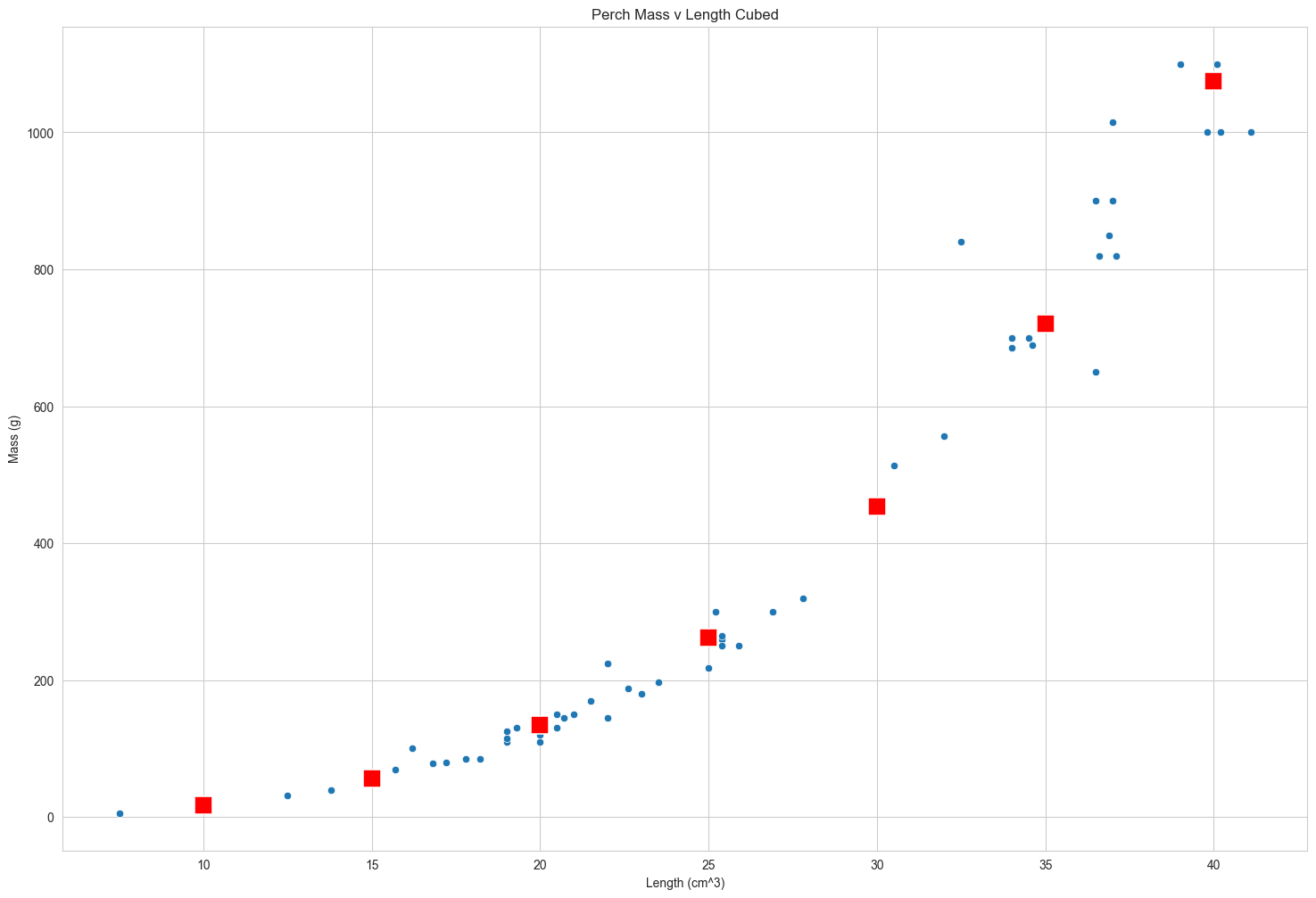
This gets more interesting on the original x-axis. Notice how the red points curve upwards to follow the data. Your linear model has non-linear predictions, after the transformation is undone.
fig = plt.figure()

sns.scatterplot(x = 'length_cm'
           ,y = 'mass_g'
           ,data = perch
           )

sns.scatterplot(x = 'length_cm'
               ,y = 'mass_g'
               ,data = prediction_data
               ,marker = 's'
               ,s = 200
               ,color = 'red')

plt.ylabel('Mass (g)')
plt.xlabel('Length (cm^3)')
plt.title('Perch Mass v Length Cubed')
plt.show()
Quantifying model fit
It’s usually essential to know whether or not predictions from your model are nonsense. In this chapter, we’ll look at ways of quantifying how good your model is.
Bream and perch models
Previously, you ran models on mass versus length for bream and perch. By merely looking at these scatter plots, you can get a sense that there is a linear relationship between mass and length for bream but not for perch. It would be useful to quantify how strong that linear relationship is.
Coefficient of determination
The first metric we’ll discuss is the coefficient of determination. This is sometimes called “r-squared”. For boring historical reasons, it’s written with a lower case r for simple linear regression and an upper case R when you have more than one explanatory variable. It is defined as the proportion of the variance in the response variable that is predictable from the explanatory variable. We’ll get to a human-readable explanation shortly. A score of one means you have a perfect fit, and a score of zero means your model is no better than randomness. What constitutes a good score depends on your dataset. A score of zero-point five on a psychological experiment may be exceptionally high because humans are inherently hard to predict, but in other cases, a score of zero-point nine may be considered a poor fit.
- The proportion of the variance in the response variable that is predictable from the explanatory variable.
- 1 means a perfect fit
- 0 means the worst possible fit
.summary()
The dot summary method shows several performance metrics in its output. The coefficient of determination is written in the first line and titled “R-squared”. Its value is about zero-point-nine-one.
print(mdl_bream.summary())
                            OLS Regression Results
==============================================================================
Dep. Variable:                 mass_g   R-squared:                       0.911
Model:                            OLS   Adj. R-squared:                  0.908
Method:                 Least Squares   F-statistic:                     328.4
Date:                Tue, 19 Dec 2023   Prob (F-statistic):           2.18e-18
Time:                        17:42:23   Log-Likelihood:                -187.82
No. Observations:                  34   AIC:                             379.6
Df Residuals:                      32   BIC:                             382.7
Df Model:                           1
Covariance Type:            nonrobust
==============================================================================
                 coef    std err          t      P>|t|      [0.025      0.975]
------------------------------------------------------------------------------
Intercept  -1015.0498     91.184    -11.132      0.000   -1200.786    -829.314
length_cm     54.1075      2.986     18.123      0.000      48.026      60.189
==============================================================================
Omnibus:                        9.859   Durbin-Watson:                   1.368
Prob(Omnibus):                  0.007   Jarque-Bera (JB):                9.210
Skew:                           0.946   Prob(JB):                       0.0100
Kurtosis:                       4.709   Cond. No.                         260.
==============================================================================

Notes:
[1] Standard Errors assume that the covariance matrix of the errors is correctly specified.
.rsquared attribute
Since the output of dot summary isn’t easy to work with, a better way to extract the metric is to use the rsquared attribute, which contains the r-squared value as a float.
print('Rsquared:',mdl_bream.rsquared)
Rsquared: 0.911218550754384
It’s just correlation squared
For simple linear regression, the interpretation of the coefficient of determination (r-value) is straightforward. It is simply the correlation between the explanatory and response variables, squared.
# coeff_determination = independent_var.corr(dependent_var) ** 2
coeff_determination = bream['length_cm'].corr(bream['mass_g']) ** 2
print('Coefficient of determination:',coeff_determination)
Coefficient of determination: 0.9112185507543842
Residual standard error (RSE)
The second metric we’ll look at is the residual standard error, or RSE. Recall that each residual is the difference between a predicted value and an observed value. The RSE is, very roughly speaking, a measure of the typical size of the residuals. That is, how much the predictions are typically wrong. It has the same unit as the response variable. In the fish models, the response unit is grams. A related, but less commonly used metric is the mean squared error, or MSE. As the name suggests, MSE is the squared residual standard error.
- A “typical” difference between a predicted value and an observed value
- It has the same unit as the response variable
- $MSE = RSE^{2}$
x = df['length_cm']
y = df['fitted_values']
dy = df['residuals']

fig, ax = plt.subplots()
ax.plot(x,y)
ax.scatter(x,y+dy)

ax.vlines(x,y,y+dy)

plt.ylabel('Length in Cm')
plt.xlabel('Mass in G')
plt.title('Plot of Residuals for OLS of Length v Mass')
plt.show()
.mse_resid attribute
The summary method unfortunately doesn’t contain the RSE. However, it can indirectly be retrieved from the .mse_resid attribute, which contains the mean squared error of the residuals. We can calculate the RSE by taking the square root of MSE. As such, the RSE has the same unit as the response variable. The RSE for the bream model is about seventy-four.
print('mse:', mdl_bream.mse_resid)
print('rse:', mdl_bream.mse_resid ** 0.5)
mse: 3908.1039073862407
rse: 62.51482949977742
 My Data Was A Miner