In this chapter, you’ll dive into more advanced data cleaning problems, such as ensuring that weights are all written in kilograms instead of pounds. You’ll also gain invaluable skills that will help you verify that values have been added correctly and that missing values don’t negatively impact your analyses.
Uniform currencies
In this exercise and throughout this chapter, you will be working with a retail banking dataset stored in the banking DataFrame. The dataset contains data on the amount of money stored in accounts (acct_amount), their currency (acct_cur), amount invested (inv_amount), account opening date (account_opened), and last transaction date (last_transaction) that were consolidated from American and European branches.
You are tasked with understanding the average account size and how investments vary by the size of account, however in order to produce this analysis accurately, you first need to unify the currency amount into dollars.
The banking dataframe has been downloaded from datacamp using the df.to_csv method, the entirety of the csv is copied and pasted as a string into google sheets and delimited accordingly.
import pandas as pd
filename = 'banking_datacamp.csv'
banking = pd.read_csv(filename, index_col=0)

print(banking)
     cust_id  acct_amount acct_cur  inv_amount account_opened last_transaction
0   8C35540A     44244.71   dollar    35500.50       03-05-18         30-09-19
1   D5536652     86506.85   dollar    81921.86       21-01-18         14-01-19
2   A631984D     77799.33   dollar    46412.27       26-01-18         06-10-19
3   93F2F951     93875.24     euro    76563.35       21-08-17         10-07-19
4   DE0A0882     99998.35     euro    18669.01       05-06-17         15-01-19
..       ...          ...      ...         ...            ...              ...
92  CEC1CAE5     92169.14   dollar    77896.86       26-11-17         08-10-18
93  4C7F8638     21942.37   dollar    11715.24       14-07-18         02-02-19
94  A81D31B3     74010.15   dollar    48787.47       02-06-18         12-09-18
95  93A17007     40651.36   dollar     9387.87       28-05-17         08-03-19
96  E961CA44     27907.16   dollar    10967.69       23-10-17         11-07-19

[97 rows x 6 columns]
# Find values of acct_cur that are equal to 'euro'
acct_eu = banking['acct_cur'] == 'euro'

# Convert acct_amount where it is in euro to dollars
banking.loc[acct_eu, 'acct_amount'] = banking.loc[acct_eu, 'acct_amount'] * 1.1

# Unify acct_cur column by changing 'euro' values to 'dollar'
banking.loc[acct_eu, 'acct_cur'] = 'dollar'

# Assert that only dollar currency remains
assert banking['acct_cur'].unique() == 'dollar'

print(banking)
     cust_id  acct_amount acct_cur  inv_amount account_opened last_transaction
0   8C35540A    44244.710   dollar    35500.50       03-05-18         30-09-19
1   D5536652    86506.850   dollar    81921.86       21-01-18         14-01-19
2   A631984D    77799.330   dollar    46412.27       26-01-18         06-10-19
3   93F2F951   103262.764   dollar    76563.35       21-08-17         10-07-19
4   DE0A0882   109998.185   dollar    18669.01       05-06-17         15-01-19
..       ...          ...      ...         ...            ...              ...
92  CEC1CAE5    92169.140   dollar    77896.86       26-11-17         08-10-18
93  4C7F8638    21942.370   dollar    11715.24       14-07-18         02-02-19
94  A81D31B3    74010.150   dollar    48787.47       02-06-18         12-09-18
95  93A17007    40651.360   dollar     9387.87       28-05-17         08-03-19
96  E961CA44    27907.160   dollar    10967.69       23-10-17         11-07-19

[97 rows x 6 columns]
Uniform dates
After having unified the currencies of your different account amounts, you want to add a temporal dimension to your analysis and see how customers have been investing their money given the size of their account over each year. The account_opened column represents when customers opened their accounts and is a good proxy for segmenting customer activity and investment over time.
However, since this data was consolidated from multiple sources, you need to make sure that all dates are of the same format. You will do so by converting this column into a datetime object, while making sure that the format is inferred and potentially incorrect formats are set to missing.
# Print the header of account_opened
print(banking['account_opened'].head())
0    03-05-18
1    21-01-18
2    26-01-18
3    21-08-17
4    05-06-17
Name: account_opened, dtype: object
# Convert account_opened to datetime. It is necessary to use the infer_ and errors = aspects to ensure that
# differently formatted dates are casted appropriately.
banking['account_opened'] = pd.to_datetime(banking['account_opened'],
                                           # Infer datetime format
                                           infer_datetime_format = True,
                                           # Return missing value for error
                                           errors = 'coerce')
# Get year of account opened
banking['acct_year'] = banking['account_opened'].dt.strftime('%Y') #string-format-time method accepts the date/datetime format of your choice

# Print acct_year
print(banking['acct_year'])
0     2018
1     2018
2     2018
3     2017
4     2017
      ...
92    2017
93    2018
94    2018
95    2017
96    2017
Name: acct_year, Length: 97, dtype: object
How’s our data integrity?
The banking dataframe has been downloaded from datacamp using the df.to_csv method, the entirety of the csv is copied and pasted as a string into google sheets and delimited accordingly.
New data has been merged into the banking DataFrame that contains details on how investments in the inv_amount column are allocated across four different funds A, B, C and D.
Furthermore, the age and birthdays of customers are now stored in the age and birth_date columns respectively.
You want to understand how customers of different age groups invest. However, you want to first make sure the data you’re analyzing is correct. You will do so by cross field checking values of inv_amount and age against the amount invested in different funds and customers’ birthdays.
filename = 'banking_datacamp2.csv'
banking = pd.read_csv(filename, index_col=0)

import datetime as dt

# Convert birth_date to datetime. It is necessary to use the infer_ and errors = aspects to ensure that
# differently formatted dates are casted appropriately.
# https://pandas.pydata.org/pandas-docs/stable/reference/api/pandas.to_datetime.html

banking['birth_date'] = pd.to_datetime(banking['birth_date'], infer_datetime_format = True, errors = 'coerce')

# Store today's date and find ages
today = dt.date.today()
ages_manual = today.year - banking['birth_date'].dt.year

# Find rows where age column == ages_manual
age_equ = ages_manual == banking['age']

# Store consistent and inconsistent data
consistent_ages = banking[age_equ]
inconsistent_ages = banking[~age_equ]

# Store consistent and inconsistent data
print("Number of inconsistent ages: ", inconsistent_ages.shape[0])
Number of inconsistent ages: 4
Missing investors
Dealing with missing data is one of the most common tasks in data science. There are a variety of types of missingness, as well as a variety of types of solutions to missing data.
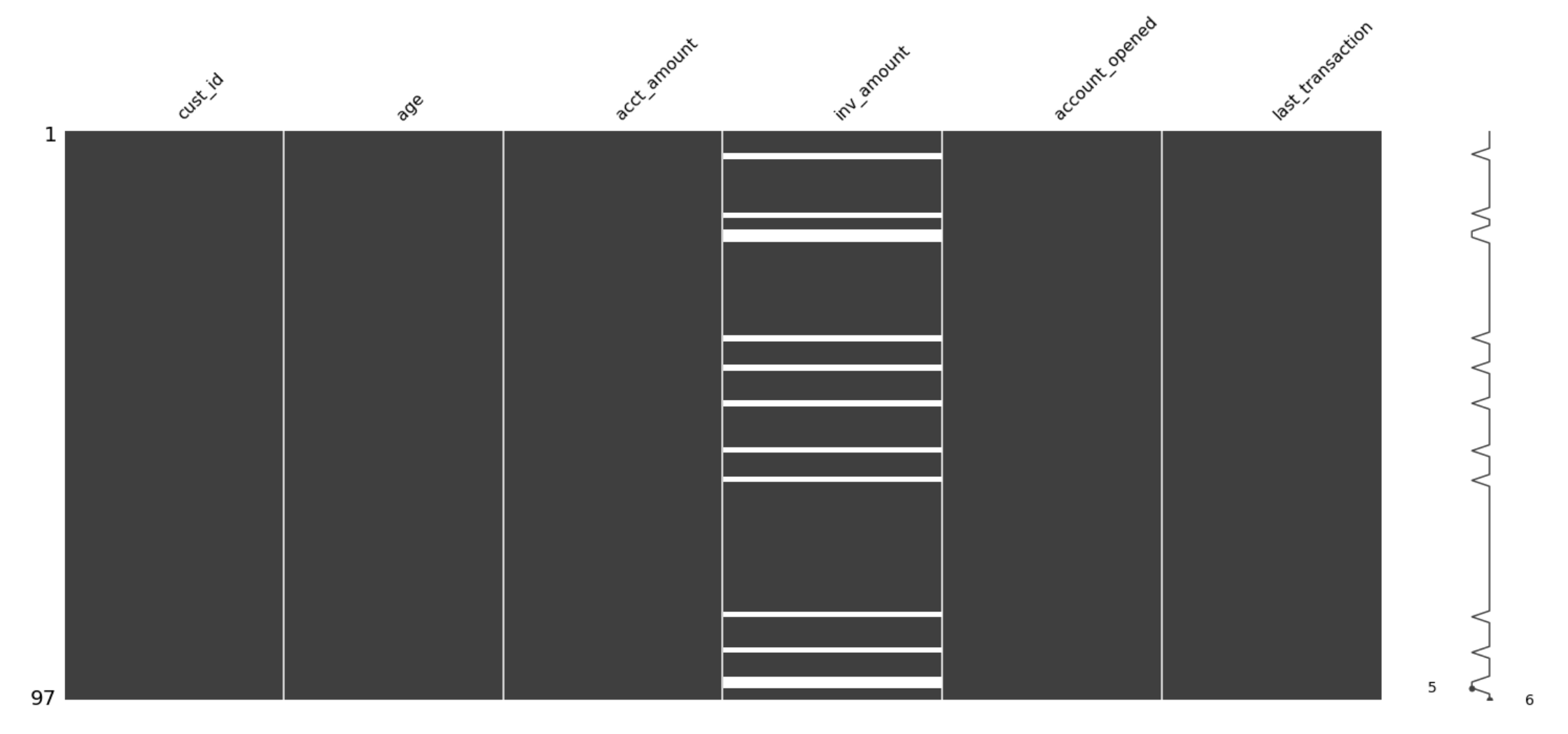
You just received a new version of the banking DataFrame containing data on the amount held and invested for new and existing customers. However, there are rows with missing inv_amount values.
You know for a fact that most customers below 25 do not have investment accounts yet, and suspect it could be driving the missingness.
#!pip3 install missingno
filename = 'banking_datacamp3.csv'
banking = pd.read_csv(filename, index_col=0)


# Print number of missing values in banking
print(banking.isna().sum())

# Visualize missingness matrix
msno.matrix(banking)
plt.show()
cust_id              0
age                  0
acct_amount          0
inv_amount          13
account_opened       0
last_transaction     0
dtype: int64
# Isolate missing and non missing values of inv_amount
missing_investors = banking[banking['inv_amount'].isna()]
investors = banking[~banking['inv_amount'].isna()]

missing_investors.describe()
vertical-align: middle;
}.dataframe tbody tr th {
vertical-align: top;
}
.dataframe thead th {
text-align: right;
}
| age | acct_amount | inv_amount | |
|---|---|---|---|
| count | 13.000000 | 13.000000 | 0.0 |
| mean | 21.846154 | 73231.238462 | NaN |
| std | 1.519109 | 25553.327176 | NaN |
| min | 20.000000 | 21942.370000 | NaN |
| 25% | 21.000000 | 66947.300000 | NaN |
| 50% | 21.000000 | 86028.480000 | NaN |
| 75% | 23.000000 | 89855.980000 | NaN |
| max | 25.000000 | 99998.350000 | NaN |
investors.describe()
vertical-align: middle;
}.dataframe tbody tr th {
vertical-align: top;
}
.dataframe thead th {
text-align: right;
}
| age | acct_amount | inv_amount | |
|---|---|---|---|
| count | 84.000000 | 84.000000 | 84.000000 |
| mean | 43.559524 | 75095.273214 | 44717.885476 |
| std | 10.411244 | 32414.506022 | 26031.246094 |
| min | 26.000000 | 12209.840000 | 3216.720000 |
| 25% | 34.000000 | 57373.062500 | 22736.037500 |
| 50% | 45.000000 | 83061.845000 | 44498.460000 |
| 75% | 53.000000 | 94165.965000 | 66176.802500 |
| max | 59.000000 | 250046.760000 | 93552.690000 |
# The inv_amount is missing only for young customers, since the average age in missing_investors is 22 and the maximum age is 25.

# Sort banking by age and visualize
banking_sorted = banking.sort_values(by = 'age')
msno.matrix(banking_sorted)
plt.show()

Follow the money
In this exercise, you’re working with another version of the banking DataFrame that contains missing values for both the cust_id column and the acct_amount column.
You want to produce analysis on how many unique customers the bank has, the average amount held by customers and more. You know that rows with missing cust_id don’t really help you, and that on average acct_amount is usually 5 times the amount of inv_amount.
In this exercise, you will drop rows of banking with missing cust_ids, and impute missing values of acct_amount with some domain knowledge.
filename = 'banking_datacamp4.csv'
banking = pd.read_csv(filename, index_col = 0)

# Print number of missing values
print(banking.isna().sum())
cust_id              9
acct_amount         14
inv_amount           0
account_opened       0
last_transaction     0
dtype: int64
# Drop missing values of cust_id
banking_fullid = banking.dropna(subset = ['cust_id'])

# Compute estimated acct_amount
acct_imp = banking_fullid['inv_amount'] * 5

# Impute missing acct_amount with corresponding acct_imp
banking_imputed = banking_fullid.fillna({'acct_amount':acct_imp})

# Print number of missing values
print(banking_imputed.isna().sum())
cust_id             0
acct_amount         0
inv_amount          0
account_opened      0
last_transaction    0
dtype: int64
 My Data Was A Miner