Read, clean, and validate
The first step of almost any data project is to read the data, check for errors and special cases, and prepare data for analysis. This is exactly what you’ll do in this chapter, while working with a dataset obtained from the National Survey of Family Growth.
Read the codebook
When you work with datasets like the NSFG, it is important to read the documentation carefully. If you interpret a variable incorrectly, you can generate nonsense results and never realize it. So before you start coding, you’ll need to get familiar with the NSFG codebook, which describes every variable.
Code books can be found here: https://www.cdc.gov/nchs/nsfg/nsfg_questionnaires.htm
We are using the 2013-2015 Female Pregnancy Data, and the code books for this data can be found here:
https://www.cdc.gov/nchs/data/nsfg/2013-2015_NSFG_FemPregFile_Codebook-508.pdf
# import
import pandas as pd
import numpy as np

# Data found at https://ftp.cdc.gov/pub/Health_Statistics/NCHS/Datasets/NSFG/
nsfg2013_2015 = pd.read_csv('2013_2015_FemPregData.dat', header=None)

# Select columns
nsfg['caseid'] = nsfg2013_2015[0].str[0:5].str.strip().replace('',np.nan) #CASEID(1-5)
nsfg['outcome'] = nsfg2013_2015[0].str[310:311].str.strip().replace('',np.nan) #OUTCOME(311-311)
nsfg['birthwgt_lb1'] = nsfg2013_2015[0].str[45:47].str.strip().replace('',np.nan).astype(float) #BIRTHWGT_LB1(46-47)
nsfg['birthwgt_oz1'] = nsfg2013_2015[0].str[47:49].str.strip().replace('',np.nan).astype(float) #BIRTHWGT_OZ1(48-49)
nsfg['prglngth'] = nsfg2013_2015[0].str[308:310].str.strip().replace('',np.nan).astype(float) #PRGLNGTH(309-310)
nsfg['nbrnaliv'] = nsfg2013_2015[0].str[15:16].str.strip().replace('',np.nan) #NBRNALIV(16-16)
nsfg['agecon'] = nsfg2013_2015[0].str[325:329].str.strip().replace('',np.nan) #AGECON(326-329)
nsfg['agepreg'] = nsfg2013_2015[0].str[317:321].str.strip().replace('',np.nan) #AGEPREG(318-321)
nsfg['hpagelb'] = nsfg2013_2015[0].str[74:76].str.strip().replace('',np.nan) #HPAGELB(75-76)
nsfg['wgt2013_2015'] = nsfg2013_2015[0].str[430:446].str.strip().replace('',np.nan).astype(float) #WGT2013_2015(431-446)

# .str.strip().replace('','0').astype(int)
print(nsfg.head())
  caseid outcome  birthwgt_lb1  birthwgt_oz1  prglngth nbrnaliv agecon  \
0  60418       1           5.0           4.0      40.0        1   2000
1  60418       1           4.0          12.0      36.0        1   2291
2  60418       1           5.0           4.0      36.0        1   3241
3  60419       6           NaN           NaN      33.0      NaN   3650
4  60420       1           8.0          13.0      41.0        1   2191

  agepreg hpagelb  wgt2013_2015
0    2075      22   3554.964843
1    2358      25   3554.964843
2    3308      52   3554.964843
3     NaN     NaN   2484.535358
4    2266      24   2903.782914
# Display the number of rows and columns
print(nsfg.shape)
print()

# Display the names of the columns
print(nsfg.columns)
print()
(9358, 10)

Index(['caseid', 'outcome', 'birthwgt_lb1', 'birthwgt_oz1', 'prglngth',
       'nbrnaliv', 'agecon', 'agepreg', 'hpagelb', 'wgt2013_2015'],
      dtype='object')
# Select column birthwgt_oz1: ounces
ounces = nsfg['birthwgt_oz1']

# Print the first 5 elements of ounces
print(ounces.head())
0     4.0
1    12.0
2     4.0
3     NaN
4    13.0
Name: birthwgt_oz1, dtype: float64
Clean a variable
In the NSFG dataset, the variable 'nbrnaliv' records the number of babies born alive at the end of a pregnancy.
Using .value_counts() to view the responses, you’ll see that the value 8 appears once, and if you consult the codebook, you’ll see that this value indicates that the respondent refused to answer the question.
# Print the values and their frequencies
print(nsfg['nbrnaliv'].value_counts())
1    6379
2     100
3       5
8       1
Name: nbrnaliv, dtype: int64
# Replace the value 8 with NaN
nsfg['nbrnaliv'].replace(['8'], np.nan, inplace = True)

# Print the values and their frequencies
# Filter blank entries out from the sample for this assessemnt
print(nsfg['nbrnaliv'][nsfg['nbrnaliv'].isin(['1', '2', '3'])].value_counts())
1    6379
2     100
3       5
Name: nbrnaliv, dtype: int64
The missingno Library
Missingno is an excellent and simple to use Python library that provides a series of visualisations to understand the presence and distribution of missing data within a pandas dataframe. This can be in the form of either a barplot, matrix plot, heatmap, or a dendrogram.
From these plots, we can identify where missing values occur, the extent of the missingness and whether any of the missing values are correlated with each other. Often, missing values may be seen as not contributing any information, but if analysed closely there may be an underlying story.
import missingno as msno

print(nsfg.isna().sum())
caseid             0
outcome            0
birthwgt_lb1    2873
birthwgt_oz1    2967
prglngth           0
nbrnaliv        2874
agecon             0
agepreg          249
hpagelb         2873
wgt2013_2015       0
dtype: int64
msno.matrix(nsfg)
<AxesSubplot:>

Compute a variable
For each pregnancy in the NSFG dataset, the variable 'agecon' encodes the respondent’s age at conception, and 'agepreg' the respondent’s age at the end of the pregnancy.
Both variables are recorded as integers with two implicit decimal places, so the value 2575 means that the respondent’s age was 25.75.
# subset dataset so that agepreg is not null
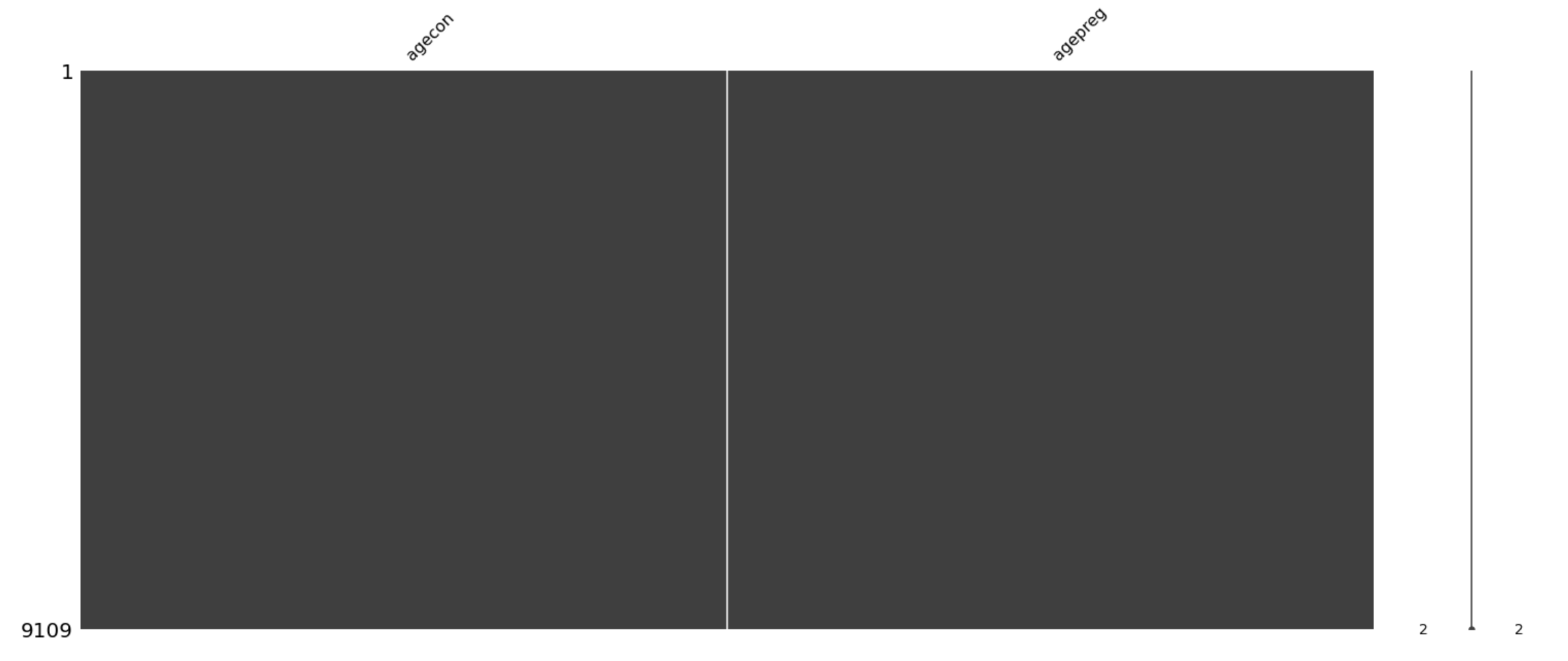
nsfg_nomsno_agepreg = nsfg[['agecon','agepreg']].dropna()

msno.matrix(nsfg_nomsno_agepreg)
<AxesSubplot:>
# Select the columns and divide by 100
agecon = nsfg_nomsno_agepreg['agecon']/100
agepreg = nsfg_nomsno_agepreg['agepreg']/100

# Compute the difference
preg_length = agepreg - agecon

# Compute summary statistics
print(preg_length.describe())
count    9109.000000
mean        0.552069
std         0.271479
min         0.000000
25%         0.250000
50%         0.670000
75%         0.750000
max         0.920000
dtype: float64
Make a histogram
Histograms are one of the most useful tools in exploratory data analysis. They quickly give you an overview of the distribution of a variable, that is, what values the variable can have, and how many times each value appears.
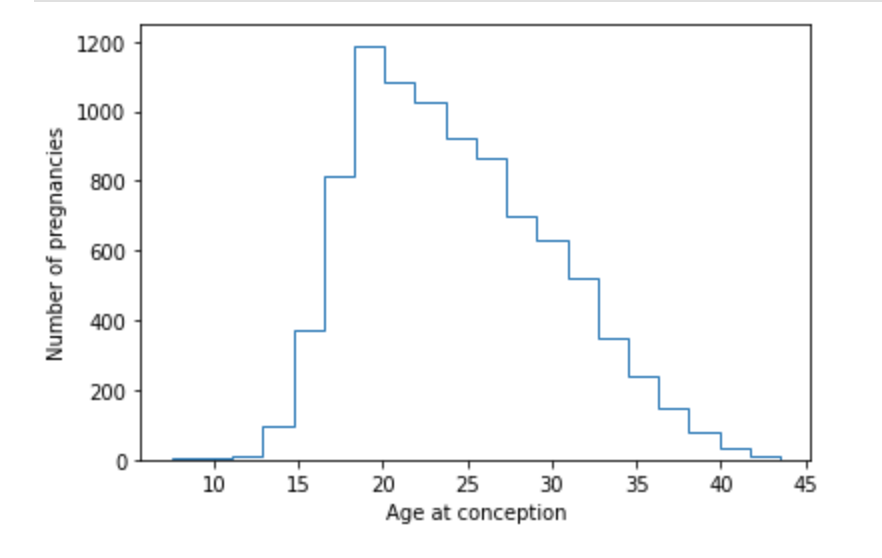
As we saw in a previous exercise, the NSFG dataset includes a variable 'agecon' that records age at conception for each pregnancy. Here, you’re going to plot a histogram of this variable. You’ll use the bins parameter and the parameter histtype.
# import
import matplotlib.pyplot as plt

# Plot the histogram
plt.hist(agecon, bins=20, width=1.6)

# Label the axes
plt.xlabel('Age at conception')
plt.ylabel('Number of pregnancies')

# Show the figure
plt.show()

# Adapt code to make an unfilled histogram by setting the parameter histtype to be 'step'

# Plot the histogram
plt.hist(agecon, bins=20, histtype = 'step')

# Label the axes
plt.xlabel('Age at conception')
plt.ylabel('Number of pregnancies')

# Show the figure
plt.show()
Compute birth weight
Now let’s pull together the steps in this chapter to compute the average birth weight for full-term babies.
I’ve provided a function, resample_rows_weighted, that takes the NSFG data and resamples it using the sampling weights in wgt2013_2015. The result is a sample that is representative of the U.S. population.
Then I extract birthwgt_lb1 and birthwgt_oz1, replace special codes with NaN, and compute total birth weight in pounds, birth_weight.
# Resample the data
nsfg = resample_rows_weighted(nsfg, 'wgt2013_2015')

# Clean the weight variables
pounds = nsfg['birthwgt_lb1'].replace([98, 99], np.nan)
ounces = nsfg['birthwgt_oz1'].replace([98, 99], np.nan)

# Compute total birth weight
birth_weight = pounds + ounces/16# subset dataset so not null
nsfg_resample = nsfg[['wgt2013_2015','birthwgt_lb1','birthwgt_oz1', 'prglngth', 'nbrnaliv']].dropna()
# subset dataset to fullterm
nsfg_fullterm_resample = nsfg_resample[nsfg_resample['prglngth'] >= 37]
print(nsfg_fullterm_resample.head())
    wgt2013_2015  birthwgt_lb1  birthwgt_oz1  prglngth nbrnaliv
0    3554.964843           5.0           4.0      40.0        1
4    2903.782914           8.0          13.0      41.0        1
9    9682.211381           8.0          10.0      39.0        1
14   2588.500365           6.0           8.0      39.0        1
15   2588.500365           5.0           8.0      37.0        1
# Clean the weight variables
pounds = nsfg_fullterm_resample['birthwgt_lb1'].replace([98, 99], np.nan)
ounces = nsfg_fullterm_resample['birthwgt_oz1'].replace([98, 99], np.nan)

# Compute total birth weight
birth_weight = pounds + ounces/16

# Create a Boolean Series for full-term babies
full_term = nsfg_fullterm_resample['prglngth'] >= 37

# Select the weights of full-term babies
full_term_weight = birth_weight[full_term]

# Compute the mean weight of full-term babies
print('Full-term mean:\n', full_term_weight.mean())
Full-term mean:
 7.372323879231473
Filter
In the previous exercise, we computed the mean birth weight for full-term babies; we filtered out preterm babies because their distribution of weight is different. The distribution of weight is also different for multiple births, like twins and triplets. In this exercise, we’ll filter them out too and see what effect it has on the mean.
# Filter single births
single = nsfg_fullterm_resample['nbrnaliv'] == '1'

# Compute birth weight for single full-term babies
single_full_term_weight = birth_weight[full_term & single]

# Compute birth weight for multiple full-term babies
mult_full_term_weight = birth_weight[full_term & ~single]

# Print Averages
print('Single full-term mean:', single_full_term_weight.mean())
print('Multiple full-term mean:', mult_full_term_weight.mean())
Single full-term mean: 7.385643450184502
Multiple full-term mean: 5.768055555555556
 My Data Was A Miner