Simple Linear Regression Modeling
We’ll learn the basics of this popular statistical model, what regression is, and how linear and logistic regressions differ. We’ll then learn how to fit simple linear regression models with numeric and categorical explanatory variables, and how to describe the relationship between the response and explanatory variables using model coefficients.
Regression lets you predict the values of a response variable from known values of explanatory variables. Which variable you use as the response variable depends on the question you are trying to answer, but in many datasets, there will be an obvious choice for variables that would be interesting to predict. Over the next few exercises, we’ll explore a Taiwan real estate dataset with four variables.
Variable                 Meaning
dist_to_mrt_station_m   Distance to nearest MRT metro station, in meters.
n_convenience           No. of convenience stores in walking distance.
house_age_years       The age of the house, in years, in three groups.
price_twd_msq           House price per unit area, in New Taiwan dollars per meter squared.
The price_twd_msq variable will make a good response variable.
This dataset can be found at the below machine learning archive:
Real estate valuation data set. (2018). UCI Machine Learning Repository.
https://archive.ics.uci.edu/dataset/477/real+estate+valuation+data+set
Visualizing two numeric variables
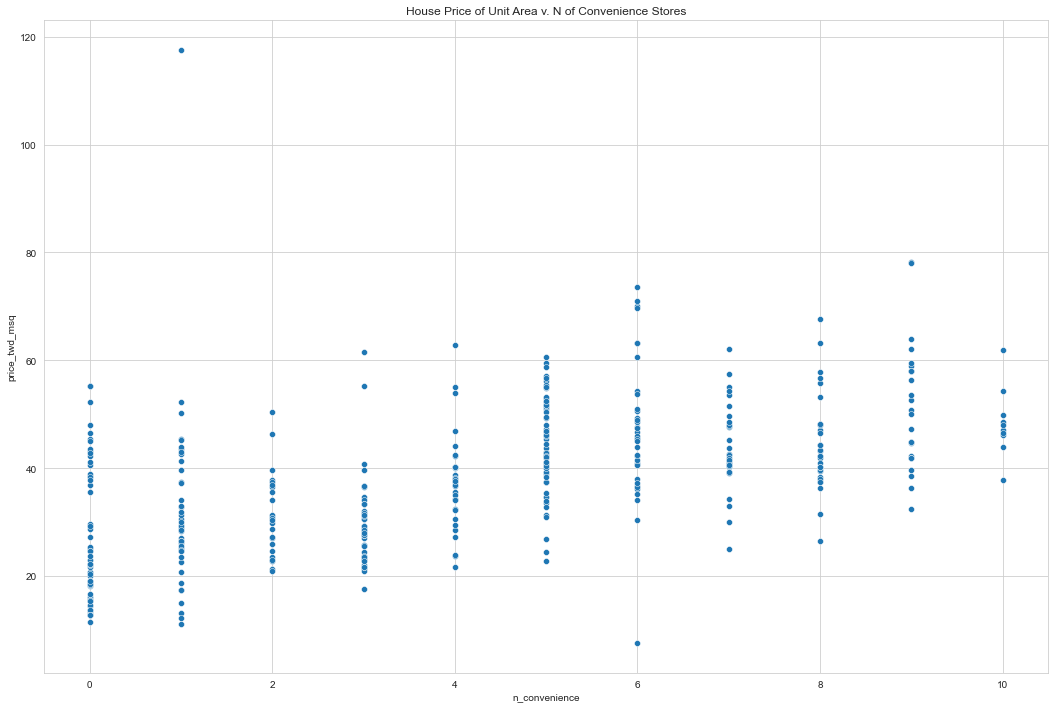
Before we can run any statistical models, it’s usually a good idea to visualize our dataset. Here, we’ll look at the relationship between house price per area and the number of nearby convenience stores using the Taiwan real estate dataset.
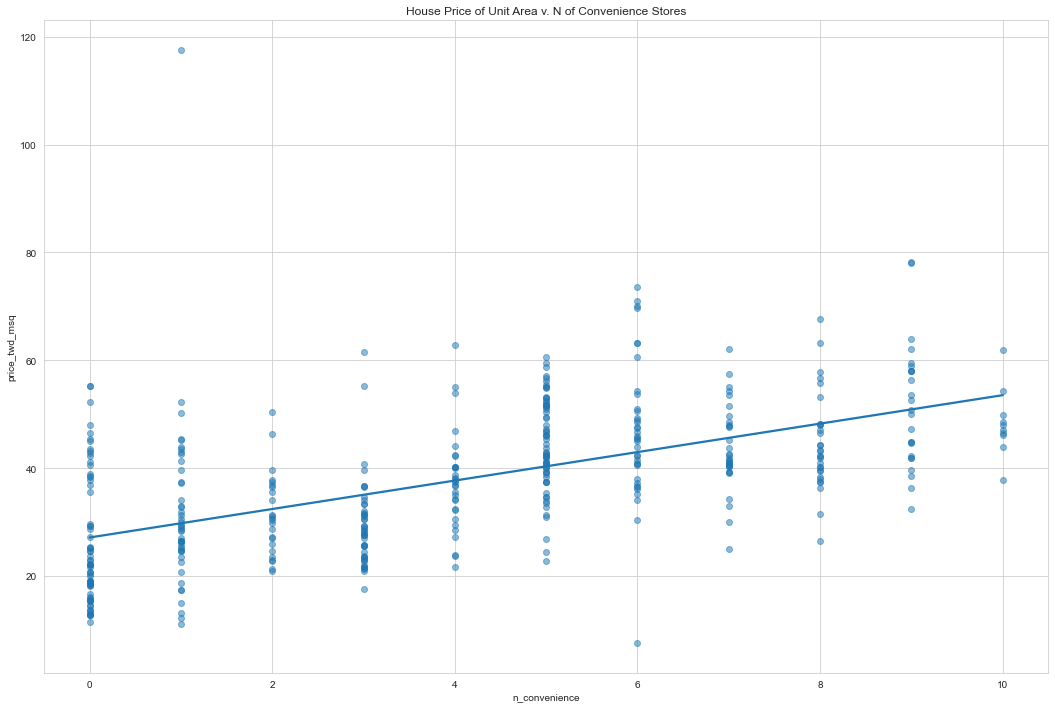
One challenge in this dataset is that the number of convenience stores contains integer data, causing points to overlap. To solve this, we will make the points transparent.
taiwan_real_estate is available as a pandas DataFrame.
# import
import seaborn as sns
import matplotlib.pyplot as plt
import pandas as pd
from statsmodels.formula.api import ols # ordinary least squares

taiwan_real_estate = pd.read_excel('Real estate valuation data set.xlsx', index_col=0)
taiwan_real_estate.rename(columns={'X1 transaction date': 'x_date',
                                   'X2 house age': 'house_age_years',
                                   'X3 distance to the nearest MRT station': 'dist_to_mrt_station_m',
                                   'X4 number of convenience stores': 'n_convenience',
                                   'X5 latitude': 'latitude',
                                   'X6 longitude': 'longitude',
                                   'Y house price of unit area': 'price_twd_msq'}, inplace = True)

print(taiwan_real_estate.head())
         x_date  house_age_years  dist_to_mrt_station_m  n_convenience  \
No
1   2012.916667             32.0               84.87882             10
2   2012.916667             19.5              306.59470              9
3   2013.583333             13.3              561.98450              5
4   2013.500000             13.3              561.98450              5
5   2012.833333              5.0              390.56840              5

    latitude  longitude  price_twd_msq
No
1   24.98298  121.54024           37.9
2   24.98034  121.53951           42.2
3   24.98746  121.54391           47.3
4   24.98746  121.54391           54.8
5   24.97937  121.54245           43.1
# Increase size of plot in jupyter
# (you will need to run the cell twice for the size change to take effect, not sure why)
plt.rcParams["figure.figsize"] = (18,12)

# house price per area and the number of nearby convenience stores
sns.scatterplot(data=taiwan_real_estate, y='price_twd_msq', x='n_convenience')
plt.title("House Price of Unit Area v. N of Convenience Stores")
plt.show()
# Set the style to display gridlines
sns.set_style('whitegrid')

# Draw a trend line on the scatter plot of price_twd_msq vs. n_convenience
# Regplots are used to plot trendlines
sns.regplot(
         x="n_convenience",
         y="price_twd_msq",
         data=taiwan_real_estate,
         ci=None,
         scatter_kws={'alpha': 0.5}) # makes the data points 50% transparent

# Show the plot
plt.title("House Price of Unit Area v. N of Convenience Stores")
plt.show()
Estimating the slope
To estimate the slope, we need two points, (35,3), and (40,5). We calculate the change in y values between the points. Now we do the same for the x axis. To estimate the slope we divide the y difference by the x difference. Let’s run a linear regression to check our guess.
(40 - 35) / (5 - 3) = 2.5Running a model
To run a linear regression model, you import the ols function from statsmodels.formula.api. OLS stands for ordinary least squares, which is a type of regression, and is commonly used. The function ols takes two arguments. The first argument is a formula: the response variable is written to the left of the tilde ~, and the explanatory variable is written to the right. The data argument takes the DataFrame containing the variables. To actually fit the model, you add the .fit() method to your freshly created model object. When you print the resulting model, it’s helpful to use the params attribute, which contains the model’s parameters. This will result in two coefficients. These coefficients are the Intercept and slope of the straight line. It seems our guesses were pretty close. The intercept is very close to our estimate of 2.5. The slope, indicated here as n_convenience, is 2.64, slightly higher than what we estimated.
Interpreting the model coefficients
That means that we expect the total house price per unit area (in New Taiwan dollars per meter squared) to be 27 plus 2.6 times the number of convenience stores. So for every additional claim, we expect the total price to increase by 2.6.
Linear regression with ols()
While sns.regplot() can display a linear regression trend line, it doesn’t give you access to the intercept and slope as variables, or allow you to work with the model results as variables. That means that sometimes you’ll need to run a linear regression ourselves.
Time to run our first model!
# Import the ols function
from statsmodels.formula.api import ols

# Create the model object
mdl_price_vs_conv = ols('price_twd_msq ~ n_convenience', data=taiwan_real_estate) #TWD is an abbreviation for Taiwan dollars.

# Fit the model
mdl_price_vs_conv = mdl_price_vs_conv.fit()

# Print the parameters of the fitted model
print(mdl_price_vs_conv.params)
Intercept        27.181105
n_convenience     2.637653
dtype: float64
Visualizing numeric vs. categorical
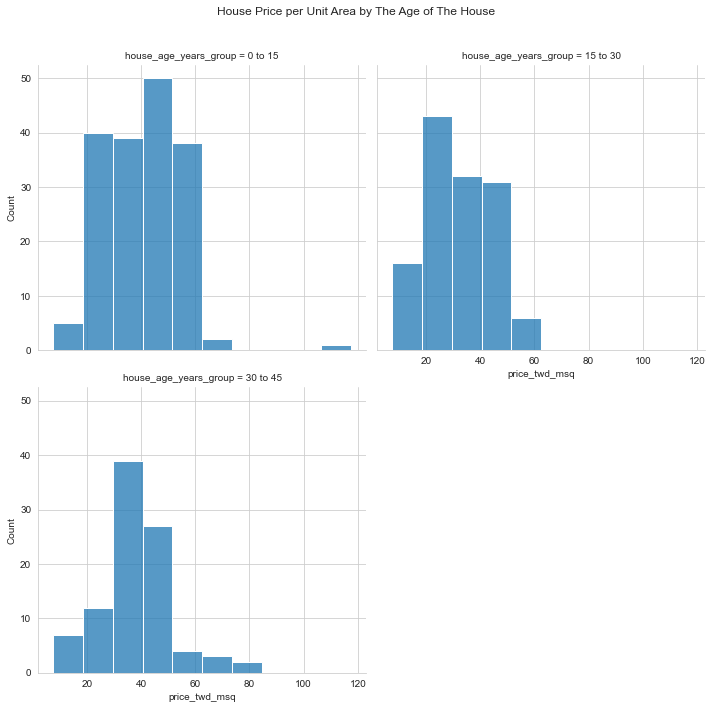
If the explanatory variable is categorical, the scatter plot that we used before to visualize the data doesn’t make sense. Instead, a good option is to draw a histogram for each category. The Taiwan real estate dataset has a categorical variable in the form of the age of each house. The ages have been split into 3 groups: 0 to 15 years, 15 to 30 years, and 30 to 45 years. taiwan_real_estate is available
# Use pd.cut to create a categorical variable from a numeric column.
# Define your boundaries (including np.inf) and category names, then apply pd.cut to the desired numeric column.
bins = [0, 15, 30, 45] # np.inf is not needed: no overflow bin needed
names = ['0 to 15', '15 to 30', '30 to 45']

taiwan_real_estate['house_age_years_group'] = pd.cut(taiwan_real_estate['house_age_years'], bins, labels=names)

print(taiwan_real_estate.dtypes)
x_date                    float64
house_age_years           float64
dist_to_mrt_station_m     float64
n_convenience               int64
latitude                  float64
longitude                 float64
price_twd_msq             float64
house_age_years_group    category
dtype: object
print(taiwan_real_estate.head())
         x_date  house_age_years  dist_to_mrt_station_m  n_convenience  \
No
1   2012.916667             32.0               84.87882             10
2   2012.916667             19.5              306.59470              9
3   2013.583333             13.3              561.98450              5
4   2013.500000             13.3              561.98450              5
5   2012.833333              5.0              390.56840              5

    latitude  longitude  price_twd_msq house_age_years_group
No
1   24.98298  121.54024           37.9              30 to 45
2   24.98034  121.53951           42.2              15 to 30
3   24.98746  121.54391           47.3               0 to 15
4   24.98746  121.54391           54.8               0 to 15
5   24.97937  121.54245           43.1               0 to 15
# Histograms of price_twd_msq with 10 bins, split by the age of each house
disp = sns.displot(data=taiwan_real_estate,
         x='price_twd_msq',
         bins=10,
         col='house_age_years_group',
         col_wrap=2)

#move overall title up
disp.fig.subplots_adjust(top=.9)

# Show the plot
disp.fig.suptitle("House Price per Unit Area by The Age of The House")
plt.show()
Calculating means by category
A good way to explore categorical variables further is to calculate summary statistics for each category. For example, we can calculate the mean and median of our response variable, grouped by a categorical variable. As such, we can compare each category in more detail.
Here, we’ll look at grouped means for the house prices in the Taiwan real estate dataset. This will help you understand the output of a linear regression with a categorical variable.
# Calculate the mean of price_twd_msq, grouped by house age
mean_price_by_age = taiwan_real_estate.groupby(by=['house_age_years_group'])['price_twd_msq'].mean()

# Print the result
print(mean_price_by_age)
house_age_years_group
0 to 15     40.404000
15 to 30    32.643750
30 to 45    37.812766
Name: price_twd_msq, dtype: float64
Linear regression with a categorical explanatory variable
The means of each category will also be the coefficients of a linear regression model with one categorical variable. We’ll prove that in this exercise.
To run a linear regression model with categorical explanatory variables, we can use the same code as with numeric explanatory variables. The coefficients returned by the model are different, however. Here we’ll run a linear regression on the Taiwan real estate dataset.
# Create the model, fit it
mdl_price_vs_age = ols('price_twd_msq ~ house_age_years_group', data=taiwan_real_estate).fit()

# Print the parameters of the fitted model
print(mdl_price_vs_age.params)
Intercept                            40.404000
house_age_years_group[T.15 to 30]    -7.760250
house_age_years_group[T.30 to 45]    -2.591234
dtype: float64
# Update the model formula to remove the intercept
mdl_price_vs_age0 = ols("price_twd_msq ~ house_age_years_group + 0", data=taiwan_real_estate).fit()

# Print the parameters of the fitted model
print(mdl_price_vs_age0.params)
house_age_years_group[0 to 15]     40.404000
house_age_years_group[15 to 30]    32.643750
house_age_years_group[30 to 45]    37.812766
dtype: float64
Predicting house prices
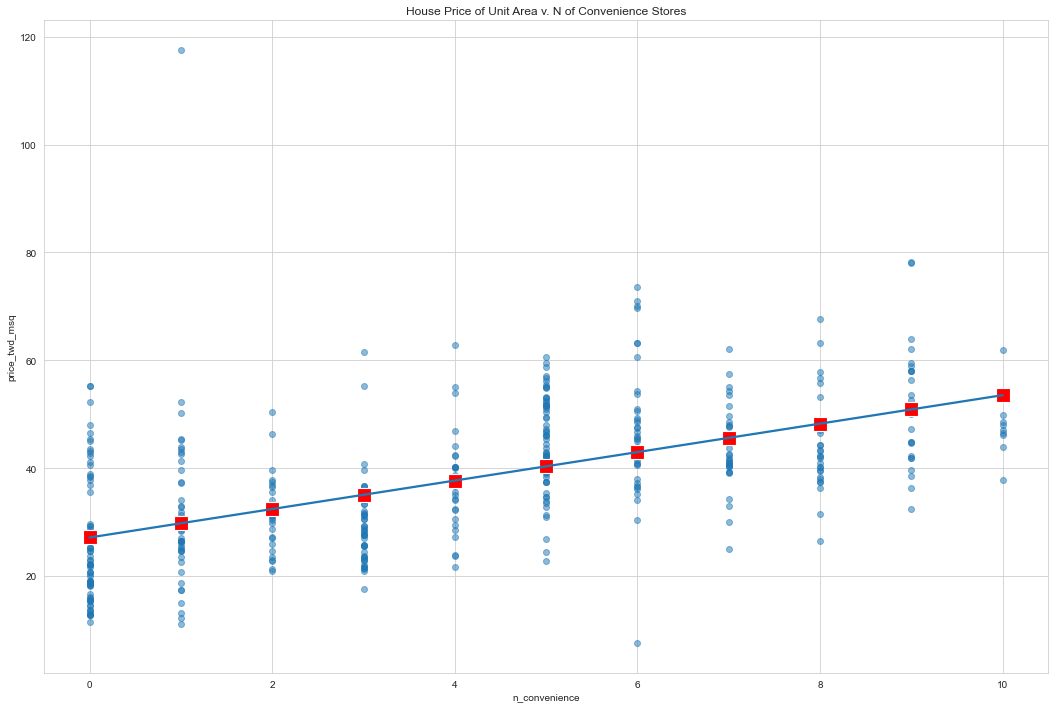
Perhaps the most useful feature of statistical models like linear regression is that you can make predictions. That is, you specify values for each of the explanatory variables, feed them to the model, and get a prediction for the corresponding response variable. The code flow is as follows.
explanatory_data = pd.DataFrame({"explanatory_var": list_of_values})
predictions = model.predict(explanatory_data)
prediction_data = explanatory_data.assign(response_var=predictions)
Here, we’ll make predictions for the house prices in the Taiwan real estate dataset.
# Import numpy with alias np
import numpy as np

# Create the explanatory_data
explanatory_data = pd.DataFrame({'n_convenience': np.arange(0,11)})

# Print it
print(explanatory_data)
    n_convenience
0               0
1               1
2               2
3               3
4               4
5               5
6               6
7               7
8               8
9               9
10             10
# Import numpy with alias np
import numpy as np

# Create explanatory_data
explanatory_data = pd.DataFrame({'n_convenience': np.arange(0, 11)})

# Use mdl_price_vs_conv to predict with explanatory_data, call it price_twd_msq
price_twd_msq = mdl_price_vs_conv.predict(explanatory_data)

# Print it
print(price_twd_msq)
0     27.181105
1     29.818758
2     32.456412
3     35.094065
4     37.731719
5     40.369372
6     43.007026
7     45.644679
8     48.282332
9     50.919986
10    53.557639
dtype: float64
# Import numpy with alias np
import numpy as np

# Create explanatory_data
explanatory_data = pd.DataFrame({'n_convenience': np.arange(0, 11)})

# Use mdl_price_vs_conv to predict with explanatory_data, call it price_twd_msq
price_twd_msq = mdl_price_vs_conv.predict(explanatory_data)

# Create prediction_data
prediction_data = explanatory_data.assign(
    price_twd_msq = price_twd_msq)

# Print the result
print(prediction_data)
    n_convenience  price_twd_msq
0               0      27.181105
1               1      29.818758
2               2      32.456412
3               3      35.094065
4               4      37.731719
5               5      40.369372
6               6      43.007026
7               7      45.644679
8               8      48.282332
9               9      50.919986
10             10      53.557639
# Create a new figure, fig
fig = plt.figure()

sns.regplot(x="n_convenience",
            y="price_twd_msq",
            data=taiwan_real_estate,
            ci=None,
            scatter_kws=({'alpha':0.5}))

# Add a scatter plot layer to the regplot
sns.scatterplot(data=prediction_data
                ,x="n_convenience"
                ,y="price_twd_msq"
                ,marker='s'
                ,color='red'
                ,s=200
                )

# Show the layered plot
plt.title("House Price of Unit Area v. N of Convenience Stores")
plt.show()
The limits of prediction
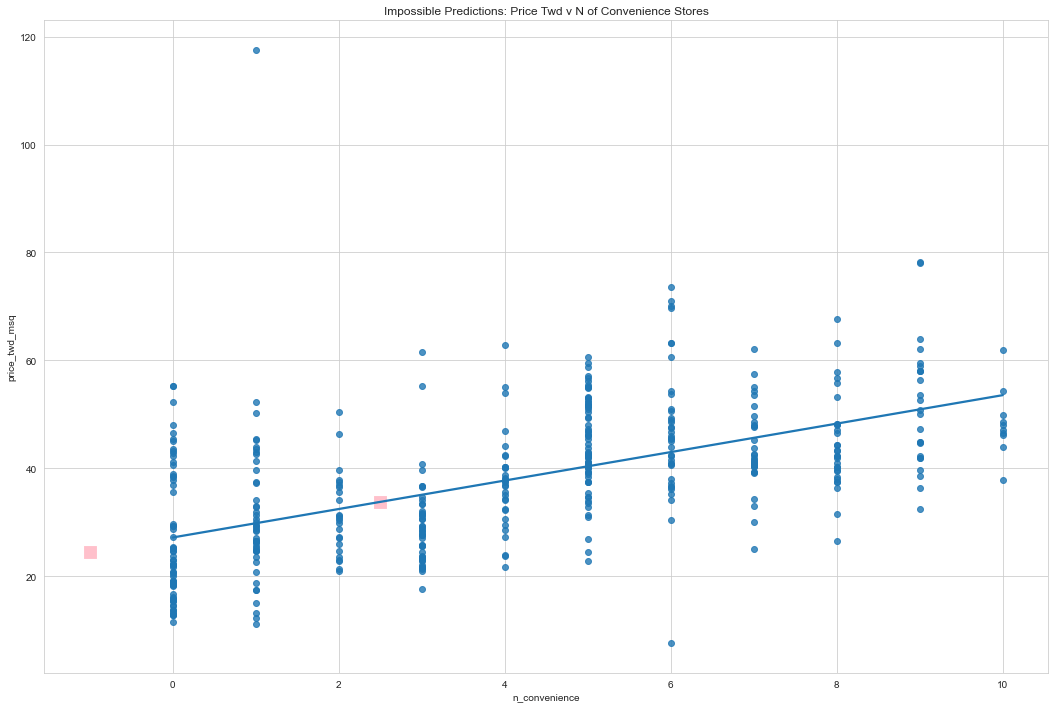
In the last exercise, we made predictions on some sensible, could-happen-in-real-life, situations. That is, the cases when the number of nearby convenience stores were between zero and ten. To test the limits of the model’s ability to predict, try some impossible situations.
Use the console to try predicting house prices from mdl_price_vs_conv when there are -1 convenience stores. Do the same for 2.5 convenience stores. What happens in each case? Will see that the model will successfully give us predictions about cases that are impossible in real life.
# Define a DataFrame impossible
impossible = pd.DataFrame({'n_convenience': (-1, 2.5)})
prediction_data = mdl_price_vs_conv.predict(impossible)

explan_predict_data = impossible.assign(price_twd_msq = prediction_data)

print(explan_predict_data)

sns.regplot(    y = 'price_twd_msq'
                ,x = 'n_convenience'
                ,data = taiwan_real_estate
                ,ci=None)

sns.scatterplot (y = 'price_twd_msq'
                ,x = 'n_convenience'
                ,data = explan_predict_data
                ,s=200
                ,color='pink'
                ,marker='s')

plt.title('Impossible Predictions: Price Twd v N of Convenience Stores')
plt.show()
   n_convenience  price_twd_msq
0           -1.0      24.543451
1            2.5      33.775238
Extracting model elements
The model object created by ols() contains many elements. In order to perform further analysis on the model results, you need to extract its useful bits. The model coefficients, the fitted values, and the residuals are perhaps the most important pieces of the linear model object.
# create the model object of price as dependent and covenience stores as the independent variable
mdl_price_vs_conv = ols('price_twd_msq ~ n_convenience', data=taiwan_real_estate).fit()
print(mdl_price_vs_conv.params)
Intercept        27.181105
n_convenience     2.637653
dtype: float64
print(mdl_price_vs_conv.fittedvalues)
No
1      53.557639
2      50.919986
3      40.369372
4      40.369372
5      40.369372
         ...
410    27.181105
411    50.919986
412    45.644679
413    40.369372
414    50.919986
Length: 414, dtype: float64
# https://www.statsmodels.org/stable/generated/statsmodels.regression.linear_model.RegressionResults.resid.html
print(mdl_price_vs_conv.resid)
No
1     -15.657639
2      -8.719986
3       6.930628
4      14.430628
5       2.730628
         ...
410   -11.781105
411    -0.919986
412    -5.044679
413    12.130628
414    12.980014
Length: 414, dtype: float64
print(mdl_price_vs_conv.summary())
                            OLS Regression Results
==============================================================================
Dep. Variable:          price_twd_msq   R-squared:                       0.326
Model:                            OLS   Adj. R-squared:                  0.324
Method:                 Least Squares   F-statistic:                     199.3
Date:                Tue, 19 Dec 2023   Prob (F-statistic):           3.41e-37
Time:                        14:03:49   Log-Likelihood:                -1586.0
No. Observations:                 414   AIC:                             3176.
Df Residuals:                     412   BIC:                             3184.
Df Model:                           1
Covariance Type:            nonrobust
=================================================================================
                    coef    std err          t      P>|t|      [0.025      0.975]
---------------------------------------------------------------------------------
Intercept        27.1811      0.942     28.857      0.000      25.330      29.033
n_convenience     2.6377      0.187     14.118      0.000       2.270       3.005
==============================================================================
Omnibus:                      171.927   Durbin-Watson:                   1.993
Prob(Omnibus):                  0.000   Jarque-Bera (JB):             1417.242
Skew:                           1.553   Prob(JB):                    1.78e-308
Kurtosis:                      11.516   Cond. No.                         8.87
==============================================================================

Notes:
[1] Standard Errors assume that the covariance matrix of the errors is correctly specified.
Manually predicting house prices
You can manually calculate the predictions from the model coefficients. When making predictions in real life, it is better to use .predict(), but doing this manually is helpful to reassure yourself that predictions aren’t magic – they are simply arithmetic.
In fact, for a simple linear regression, the predicted value is just the intercept plus the slope times the explanatory variable.
response = intercept + slope * explanatory
coeffs = mdl_price_vs_conv.params
intercept = coeffs[0]
print(intercept)
27.18110478147242
slope = coeffs[1]
print(slope)
2.6376534634043725
explanatory_data = taiwan_real_estate['n_convenience']
df = pd.DataFrame()

response_prediction = intercept + (slope * explanatory_data)
df['response_prediction']      = response_prediction
df['fittedvalues']             = mdl_price_vs_conv.fittedvalues
df['predict_explanatory_data'] = mdl_price_vs_conv.predict(explanatory_data)

print(df)
     response_prediction  fittedvalues  predict_explanatory_data
No
1              53.557639     53.557639                 53.557639
2              50.919986     50.919986                 50.919986
3              40.369372     40.369372                 40.369372
4              40.369372     40.369372                 40.369372
5              40.369372     40.369372                 40.369372
..                   ...           ...                       ...
410            27.181105     27.181105                 27.181105
411            50.919986     50.919986                 50.919986
412            45.644679     45.644679                 45.644679
413            40.369372     40.369372                 40.369372
414            50.919986     50.919986                 50.919986

[414 rows x 3 columns]
df2 = pd.DataFrame()
df2['n_convenience'] = explanatory_data
df2['fitted_values'] = mdl_price_vs_conv.fittedvalues
df2['residuals'] = mdl_price_vs_conv.resid

print(df2.head())
    n_convenience  fitted_values  residuals
No
1              10      53.557639 -15.657639
2               9      50.919986  -8.719986
3               5      40.369372   6.930628
4               5      40.369372  14.430628
5               5      40.369372   2.730628
# Graph Residuals
# reference: https://stackoverflow.com/questions/51220918/python-plot-residuals-on-a-fitted-model

y = df2['fitted_values']
x = df2['n_convenience']
dy = df2['residuals']

fig, ax = plt.subplots()
ax.plot(x,y)
ax.scatter(x,y+dy)

ax.vlines(x,y,y+dy)

plt.ylabel('Price TWD')
plt.xlabel('N of Convenience')
plt.title('Plot of Residuals for OLS of Price TWD v N of Convenience')
plt.show()

Transforming the explanatory variable
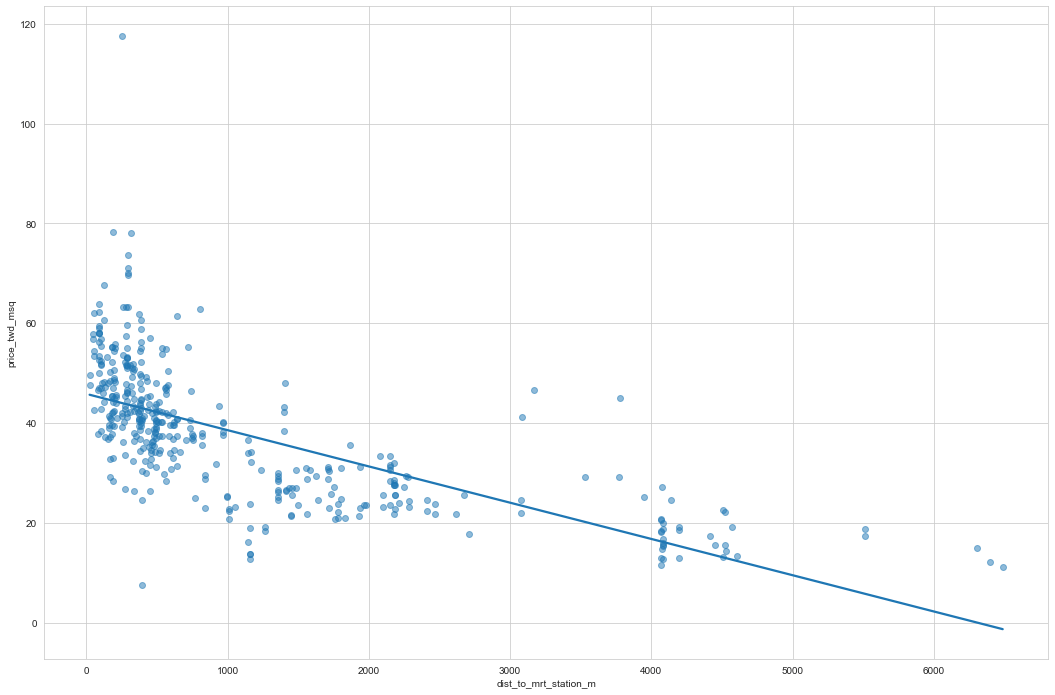
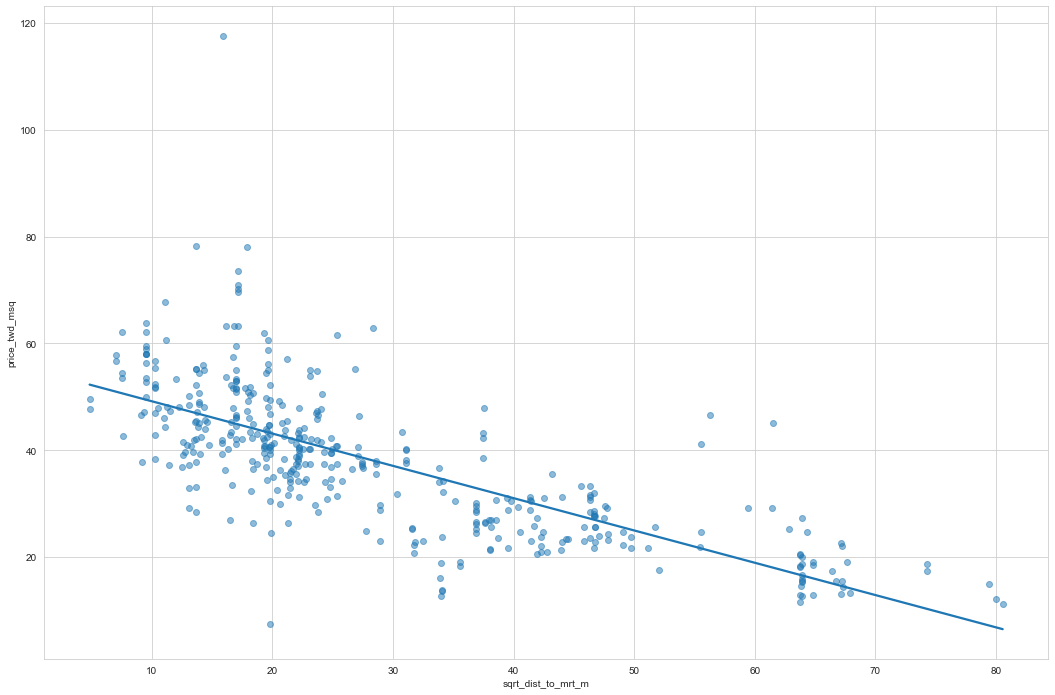
If there is no straight-line relationship between the response variable and the explanatory variable, it is sometimes possible to create one by transforming one or both of the variables. Here, you’ll look at transforming the explanatory variable.
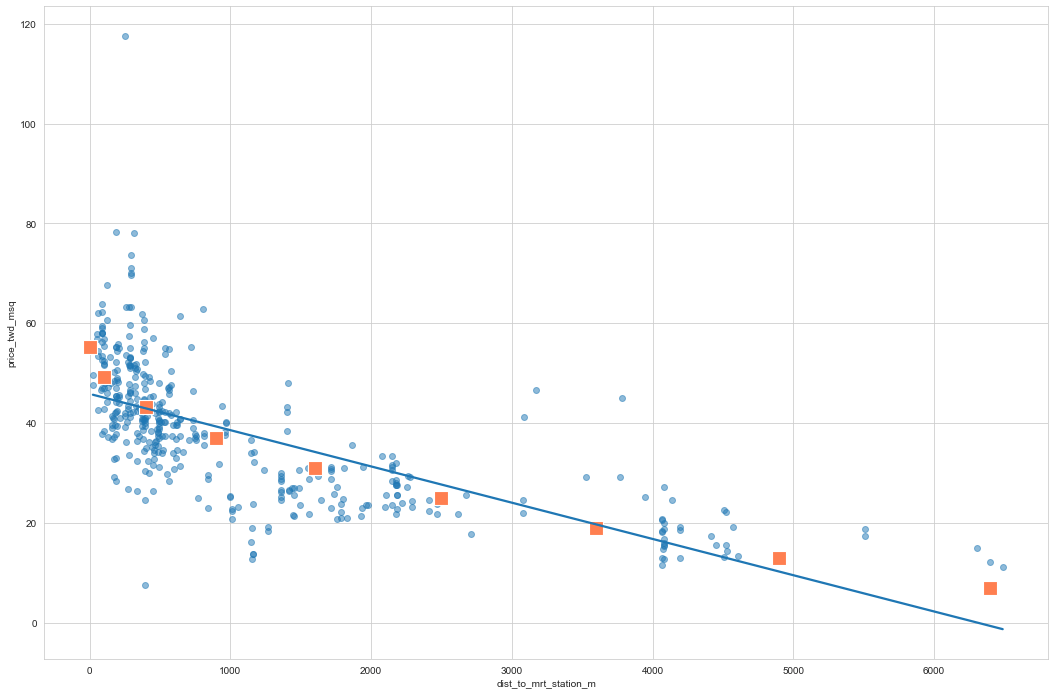
You’ll take another look at the Taiwan real estate dataset, this time using the distance to the nearest MRT (metro) station as the explanatory variable. You’ll use code to make every commuter’s dream come true: shortening the distance to the metro station by taking the square root. Take that, geography!
# Plot using the transformed variable
sns.regplot(y = 'price_twd_msq'
            ,x= 'dist_to_mrt_station_m'
            ,data = taiwan_real_estate
            ,ci = None
            ,scatter_kws = ({'alpha':0.5}))

plt.show()
# Create sqrt_dist_to_mrt_m
taiwan_real_estate["sqrt_dist_to_mrt_m"] = np.sqrt(taiwan_real_estate["dist_to_mrt_station_m"])

plt.figure()

# Plot using the transformed variable
sns.regplot(y = 'price_twd_msq'
            ,x= 'sqrt_dist_to_mrt_m'
            ,data = taiwan_real_estate
            ,ci = None
            ,scatter_kws = ({'alpha':0.5}))
plt.show()
mdl_price_sqrt_dist = ols('price_twd_msq ~ sqrt_dist_to_mrt_m', data = taiwan_real_estate).fit()
print(mdl_price_sqrt_dist.params)
Intercept             55.225885
sqrt_dist_to_mrt_m    -0.604296
dtype: float64
explanatory_data = pd.DataFrame({'sqrt_dist_to_mrt_m' : np.arange(0,81,10),
                                 'dist_to_mrt_station_m' : np.arange(0,81,10) **2})
prediction_data  = explanatory_data.assign(price_twd_msq = mdl_price_sqrt_dist.predict(explanatory_data))

fig = plt.figure()

sns.regplot(y = 'price_twd_msq'
            ,x= 'sqrt_dist_to_mrt_m'
            ,data = taiwan_real_estate
            ,ci = None
            ,scatter_kws = ({'alpha':0.5}))

sns.scatterplot(y = 'price_twd_msq'
                ,x= 'sqrt_dist_to_mrt_m'
                ,data = prediction_data
                ,marker='s'
                ,color='coral' # https://matplotlib.org/stable/gallery/color/named_colors.html
                ,s=200)
plt.show()
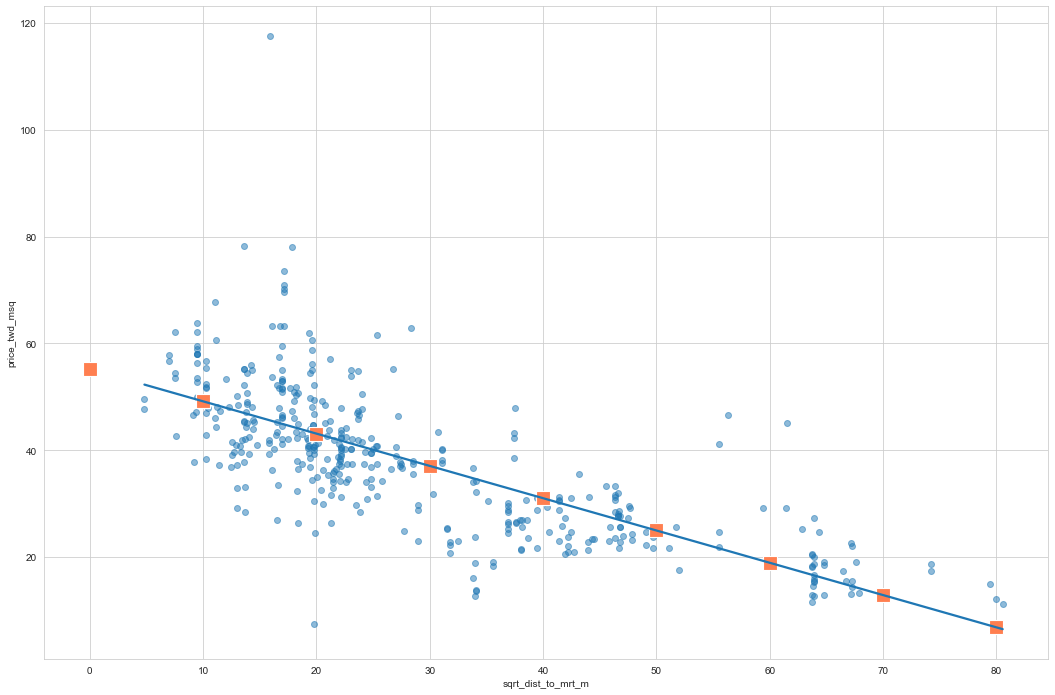
fig = plt.figure()

sns.regplot(y = 'price_twd_msq'
            ,x= 'dist_to_mrt_station_m'
            ,data = taiwan_real_estate
            ,ci = None
            ,scatter_kws = ({'alpha':0.5}))

sns.scatterplot(y = 'price_twd_msq'
                ,x= 'dist_to_mrt_station_m'
                ,data = prediction_data
                ,marker='s'
                ,color='coral' # https://matplotlib.org/stable/gallery/color/named_colors.html
                ,s=200)
plt.show()
Drawing diagnostic plots
It’s time for us to draw these diagnostic plots ourselves and the model of house prices versus number of convenience stores.
Let’s create the residuals versus fitted values plot and add a lowess argument to visualize the trend of the residuals.
# Plot the residuals vs. fitted values
sns.residplot(x='n_convenience', y='price_twd_msq', data=taiwan_real_estate, lowess=True)
plt.xlabel("Fitted values")
plt.ylabel("Residuals")

# Show the plot
plt.show()
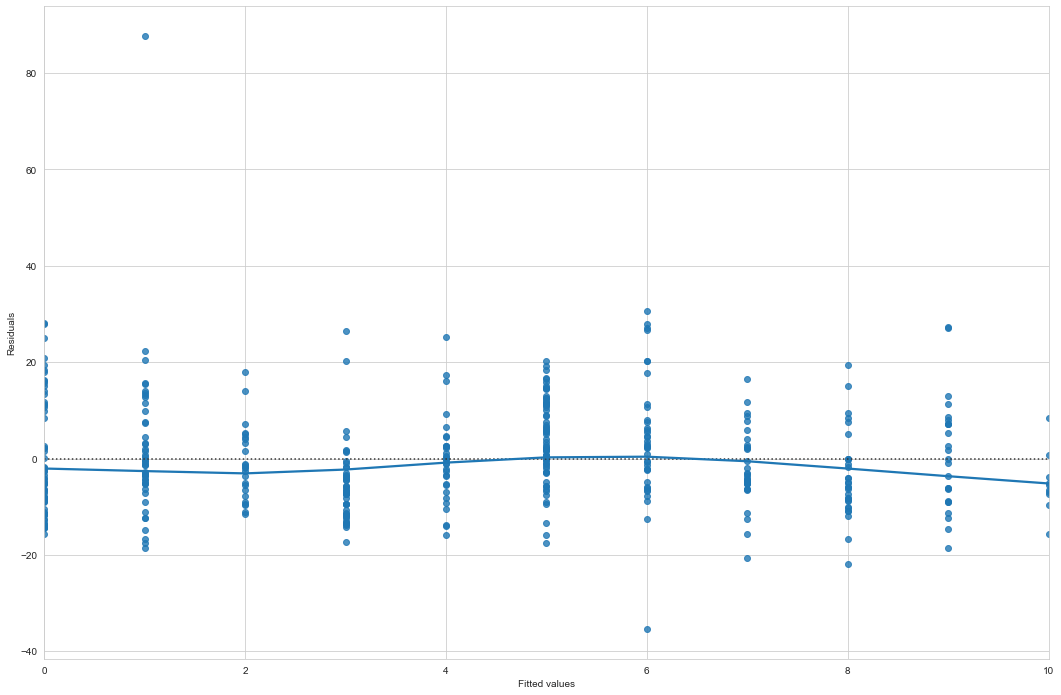
This first diagnostic plot is of residuals versus fitted values. The blue line is a LOWESS trend line, which is a smooth curve following the data. These aren’t good for making predictions but are useful for visualizing trends. If residuals met the assumption that they are normally distributed with mean zero, then the trend line should closely follow the y equals zero line on the plot.
# Import qqplot
from statsmodels.api import qqplot

# Create the Q-Q plot of the residuals
qqplot(data=mdl_price_vs_conv.resid, fit=True, line="45")

# Show the plot
plt.show()
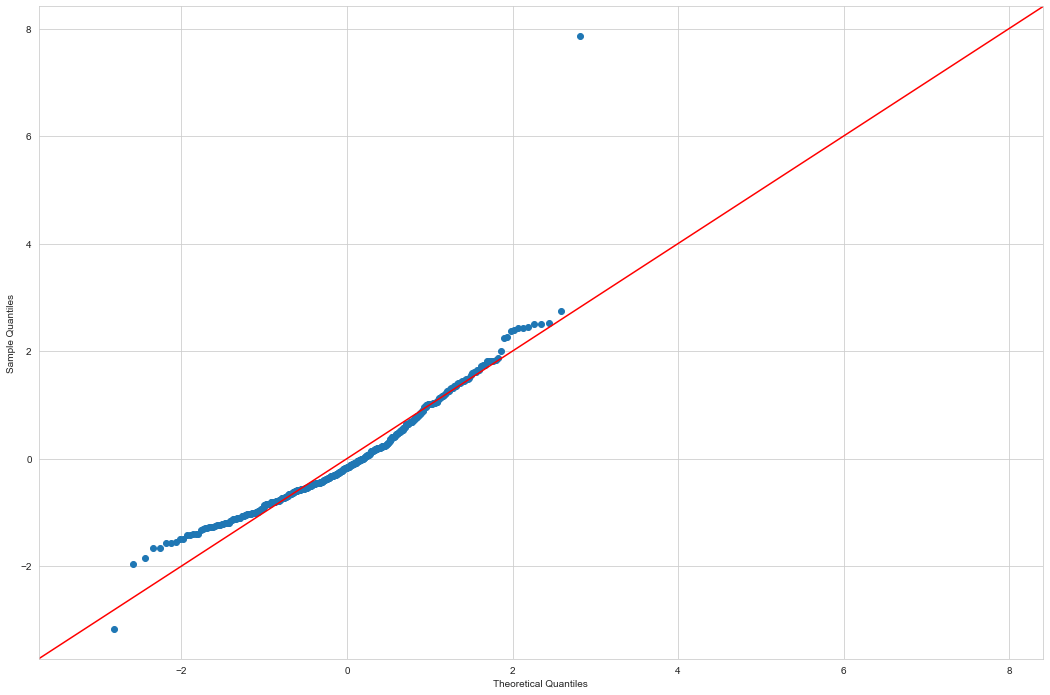
This second diagnostic plot is called a Q-Q plot. It shows whether or not the residuals follow a normal distribution. On the x-axis, the points are quantiles from the normal distribution. On the y-axis, you get the sample quantiles, which are the quantiles derived from your dataset. It sounds technical, but interpreting this plot is straightforward. If the points track along the straight line, they are normally distributed. If not, they aren’t.
# We first need to extract the normalized residuals from the model,
# which you can get by using the get_influence method, then accessing the resid_studentized_internal attribute.
model_norm_residuals = mdl_price_vs_conv.get_influence().resid_studentized_internal

# We then take the absolute values and take the square root of these normalized residuals to standardize them.
model_norm_residuals_abs_sqrt = np.sqrt(np.abs(model_norm_residuals))

# Create the scale-location plot
sns.regplot(x=mdl_price_vs_conv.fittedvalues, y=model_norm_residuals_abs_sqrt, ci=None, lowess=True)
plt.xlabel("Fitted values")
plt.ylabel("Sqrt of abs val of stdized residuals")

# Show the plot
plt.show()
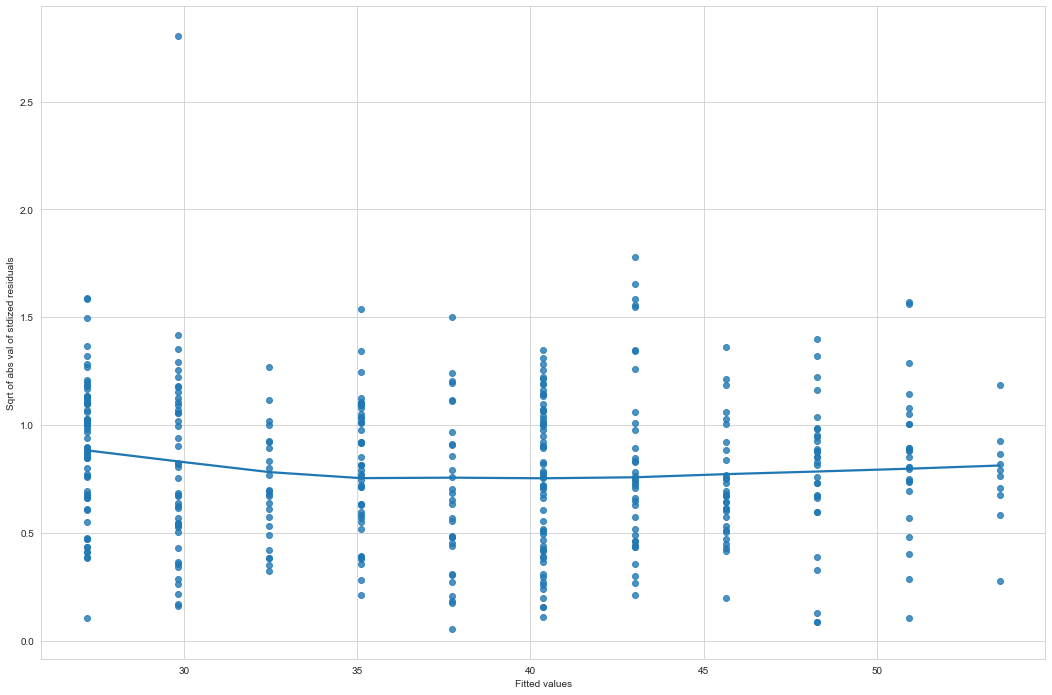
This third plot shows the square root of the standardized residuals versus the fitted values. It’s often called a scale-location plot, because that’s easier to say. Where the first plot showed whether or not the residuals go positive or negative as the fitted values change, this plot shows whether the size of the residuals gets bigger or smaller.
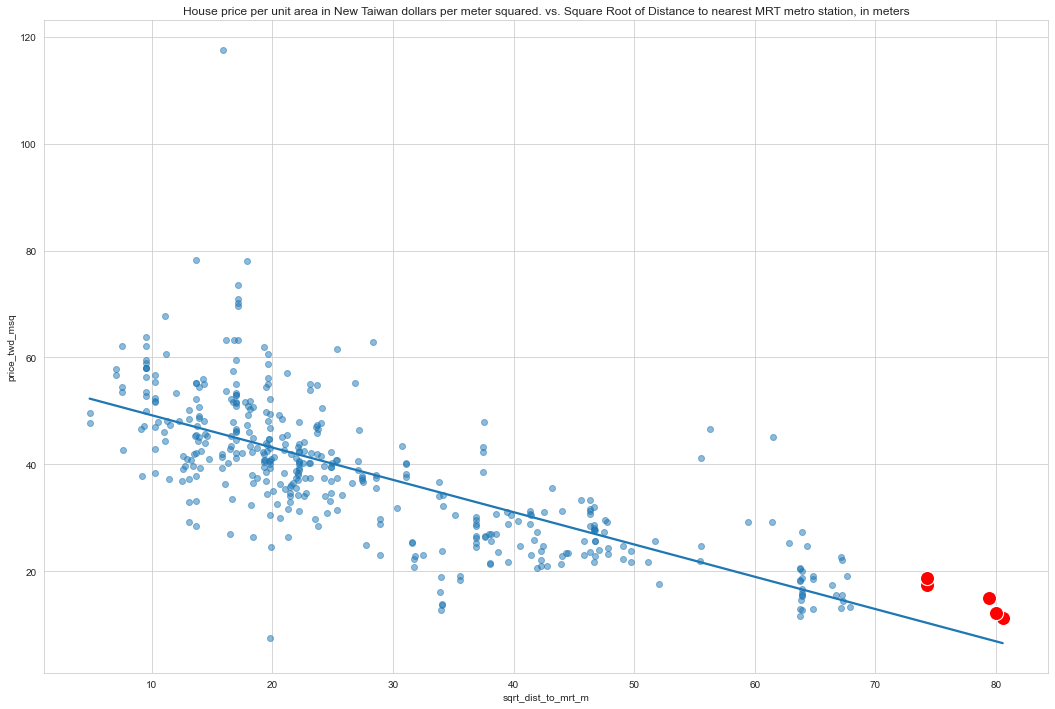
taiwan_real_estate_sorted = taiwan_real_estate.sort_values(by=['sqrt_dist_to_mrt_m'], ascending=False)
taiwan_real_estate_leverage = taiwan_real_estate_sorted.head()

print(taiwan_real_estate_leverage)
          x_date  house_age_years  dist_to_mrt_station_m  n_convenience  \
No
348  2013.583333             17.4               6488.021              1
117  2013.000000             30.9               6396.283              1
250  2012.833333             18.0               6306.153              1
256  2013.416667             31.5               5512.038              1
9    2013.500000             31.7               5512.038              1

     latitude  longitude  price_twd_msq house_age_years_group  \
No
348  24.95719  121.47353           11.2              15 to 30
117  24.94375  121.47883           12.2              30 to 45
250  24.95743  121.47516           15.0              15 to 30
256  24.95095  121.48458           17.4              30 to 45
9    24.95095  121.48458           18.8              30 to 45

     sqrt_dist_to_mrt_m
No
348           80.548253
117           79.976765
250           79.411290
256           74.243101
9             74.243101
# Create sqrt_dist_to_mrt_m
taiwan_real_estate["sqrt_dist_to_mrt_m"] = np.sqrt(taiwan_real_estate["dist_to_mrt_station_m"])

plt.figure()

# Plot using the transformed variable
sns.regplot(data=taiwan_real_estate,
            y='price_twd_msq',
            x='sqrt_dist_to_mrt_m',
            ci=None,
            scatter_kws=({'alpha':0.5}))

# Plot using the transformed variable
sns.scatterplot(data=taiwan_real_estate_leverage,
            y='price_twd_msq',
            x='sqrt_dist_to_mrt_m',
            color='red',
            s=200)


plt.title('House price per unit area in New Taiwan dollars per meter squared. vs. Square Root of Distance to nearest MRT metro station, in meters')
plt.show()
Leverage
Leverage measures how unusual or extreme the explanatory variables are for each observation. Very roughly, high leverage means that the explanatory variable has values that are different from other points in the dataset. In the case of simple linear regression, where there is only one explanatory value, this typically means values with a very high or very low explanatory value.
Observations with a large distance to the nearest MRT station have the highest leverage, because most of the observations have a short distance, so long distances are more extreme.
# Create summary_info
summary_info = mdl_price_sqrt_dist.get_influence().summary_frame()

# Add the hat_diag column to taiwan_real_estate, name it leverage
taiwan_real_estate["leverage"] = summary_info['hat_diag']

# Sort taiwan_real_estate by leverage in descending order and print the head
print(taiwan_real_estate.sort_values(by=['leverage'], ascending=False).head())
          x_date  house_age_years  dist_to_mrt_station_m  n_convenience  \
No
348  2013.583333             17.4               6488.021              1
117  2013.000000             30.9               6396.283              1
250  2012.833333             18.0               6306.153              1
256  2013.416667             31.5               5512.038              1
9    2013.500000             31.7               5512.038              1

     latitude  longitude  price_twd_msq house_age_years_group  \
No
348  24.95719  121.47353           11.2              15 to 30
117  24.94375  121.47883           12.2              30 to 45
250  24.95743  121.47516           15.0              15 to 30
256  24.95095  121.48458           17.4              30 to 45
9    24.95095  121.48458           18.8              30 to 45

     sqrt_dist_to_mrt_m  leverage
No
348           80.548253  0.026665
117           79.976765  0.026135
250           79.411290  0.025617
256           74.243101  0.021142
9             74.243101  0.021142
Influence
Influence measures how much a model would change if each observation was left out of the model calculations, one at a time. That is, it measures how different the prediction line would look if we ran a linear regression on all data points except that point, compared to running a linear regression on the whole dataset.
The standard metric for influence is Cook’s distance, which calculates influence based on the residual size and the leverage of the point. We can see the same model as last time: house price versus the square root of distance from the nearest MRT station in the Taiwan real estate dataset.
# Create summary_info
summary_info = mdl_price_sqrt_dist.get_influence().summary_frame()

# Add the hat_diag column to taiwan_real_estate, name it leverage
taiwan_real_estate["leverage"] = summary_info["hat_diag"]

# Add the cooks_d column to taiwan_real_estate, name it cooks_dist
taiwan_real_estate["cooks_dist"] = summary_info['cooks_d']

# Sort taiwan_real_estate by cooks_dist in descending order and print the head.
print(taiwan_real_estate.sort_values(by=['cooks_dist'], ascending=False).head())
          x_date  house_age_years  dist_to_mrt_station_m  n_convenience  \
No
271  2013.333333             10.8               252.5822              1
149  2013.500000             16.4              3780.5900              0
229  2013.416667             11.9              3171.3290              0
221  2013.333333             37.2               186.5101              9
114  2013.333333             14.8               393.2606              6

     latitude  longitude  price_twd_msq house_age_years_group  \
No
271  24.97460  121.53046          117.5               0 to 15
149  24.93293  121.51203           45.1              15 to 30
229  25.00115  121.51776           46.6               0 to 15
221  24.97703  121.54265           78.3              30 to 45
114  24.96172  121.53812            7.6               0 to 15

     sqrt_dist_to_mrt_m  leverage  cooks_dist
No
271           15.892835  0.003849    0.115549
149           61.486503  0.012147    0.052440
229           56.314554  0.009332    0.035384
221           13.656870  0.004401    0.025123
114           19.830799  0.003095    0.022813
Leverage and influence are important concepts for determining whether your model is overly affected by some unusual data points.
 My Data Was A Miner