In [47]:
import numpy as np
import matplotlib.pyplot as plt
import pandas as pd
from statsmodels.formula.api import ols
import seaborn as sns

# Increase size of plot in jupyter
# (you will need to run the cell twice for the size change to take effect, not sure why)
plt.rcParams["figure.figsize"] = (18,12)
sns.set_style('whitegrid')
sns.set_palette("Set2")
filename = 'ad_conversion.csv'
ad_conversion = pd.read_csv(filename, index_col=0)

print(ad_conversion.head())
   spent_usd  n_impressions  n_clicks
0       1.43           7350         1
1       1.82          17861         2
2       1.25           4259         1
3       1.29           4133         1
4       4.77          15615         3
Plot is cramped
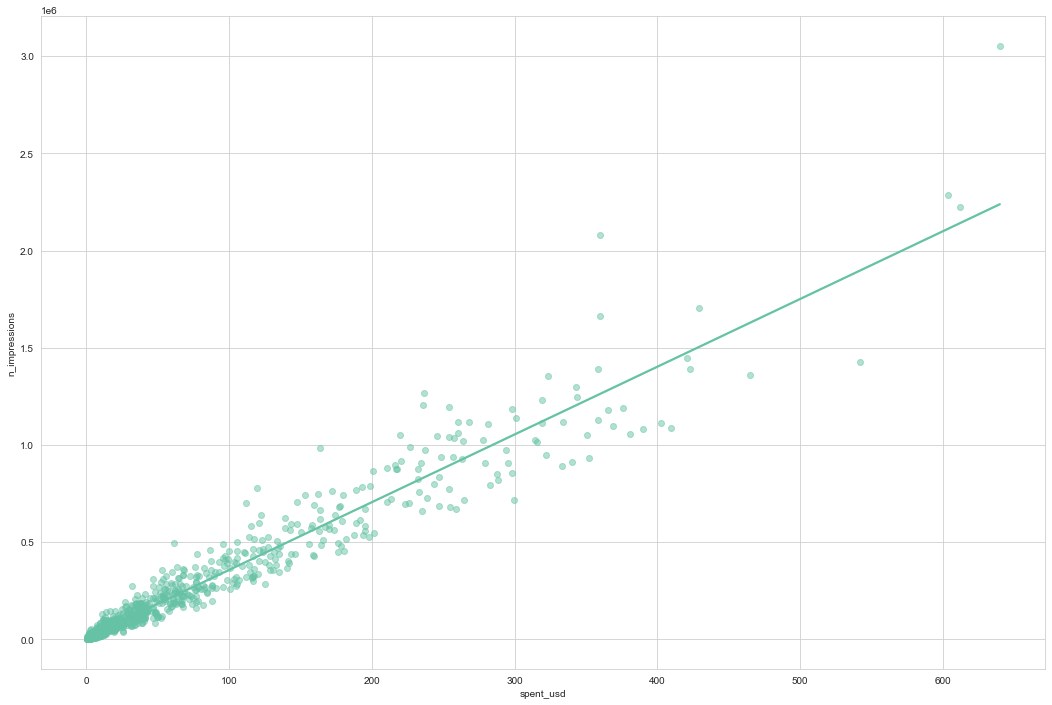
Let’s look at impressions versus spend. If we draw the standard plot, the majority of the points are crammed into the bottom-left of the plot, making it difficult to assess whether there is a good fit or not.
fig = plt.figure()

sns.regplot(data = ad_conversion
           ,x = 'spent_usd'
           ,y = 'n_impressions'
           ,ci = None
           ,scatter_kws=({'alpha':0.5}))

plt.show()
Square root vs square root
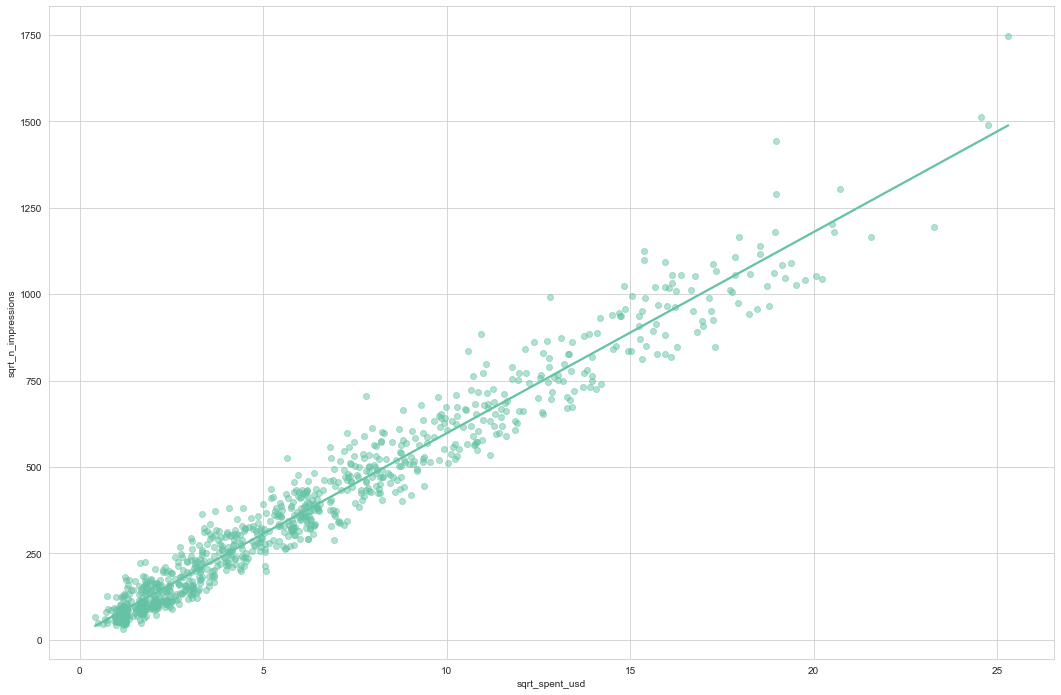
By transforming both the variables with square roots, the data are more spread out throughout the plot, and the points follow the line fairly closely. Square roots are a common transformation when your data has a right-skewed distribution.
ad_conversion['sqrt_spent_usd'] = ad_conversion['spent_usd'] ** 0.5
ad_conversion['sqrt_n_impressions'] = ad_conversion['n_impressions'] ** 0.5

fig = plt.figure()

sns.regplot(data = ad_conversion
           ,x = 'sqrt_spent_usd'
           ,y = 'sqrt_n_impressions'
           ,ci = None
           ,scatter_kws=({'alpha':0.5}))

plt.show()
Modeling and predicting
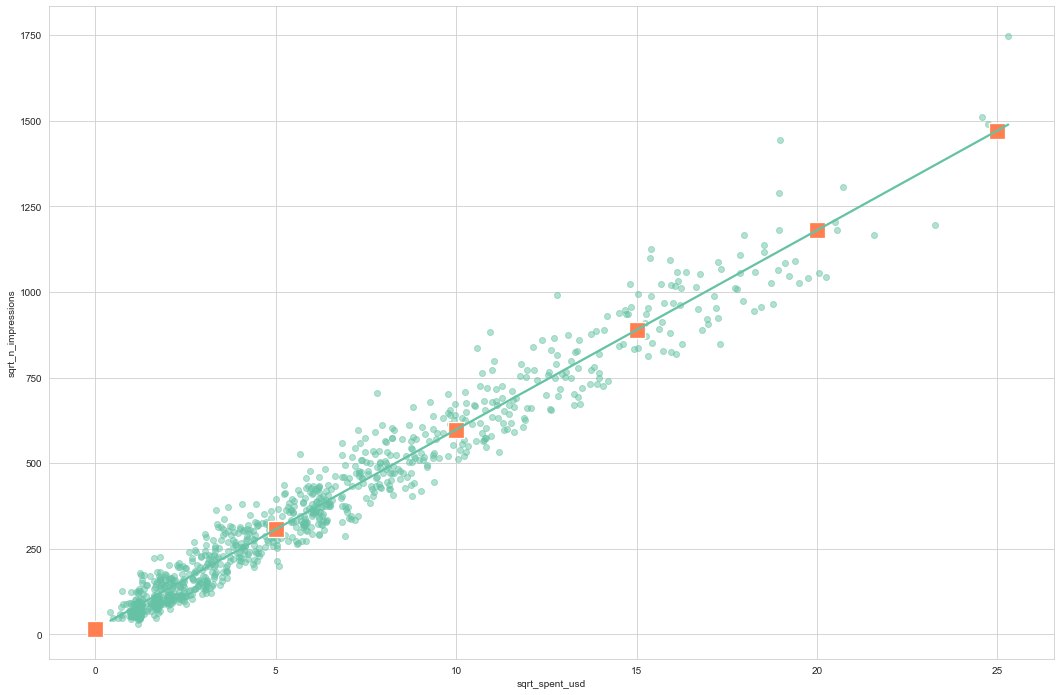
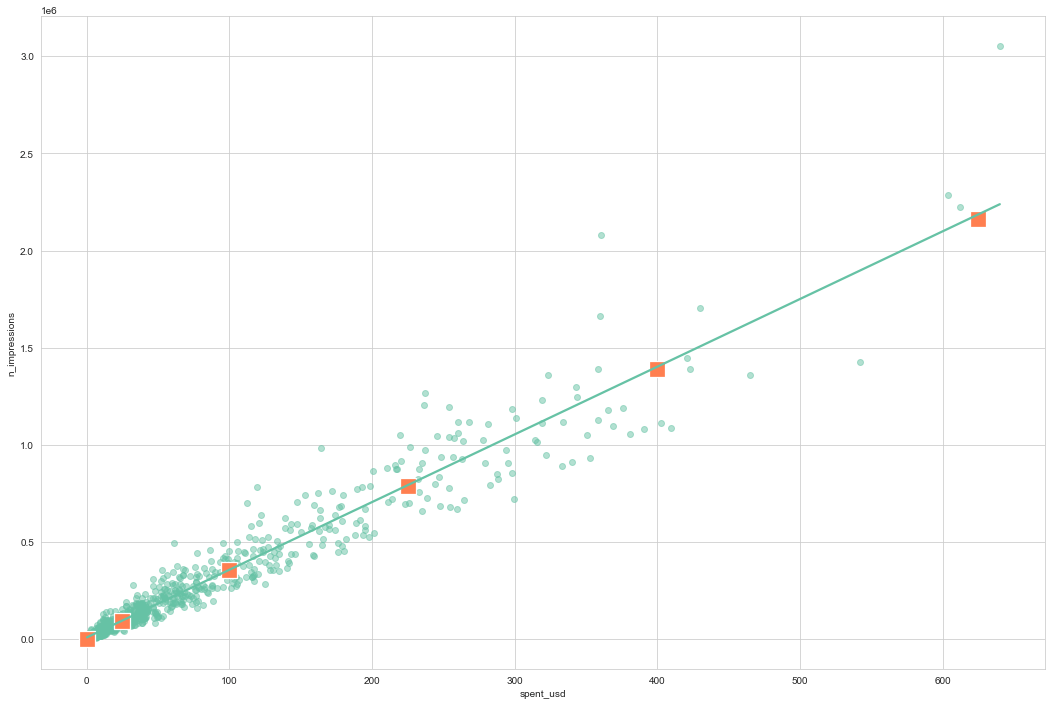
Running the model and creating the explanatory dataset are the same as usual, but notice the use of the transformed variables in the formula and DataFrame. I also included the untransformed spent_usd variable for reference. Prediction requires an extra step. Because we took the square root of the response variable (not just the explanatory variable), the predict function will predict the square root of the number of impressions. That means that we have to undo the square root by squaring the predicted responses. Undoing the transformation of the response is called back transformation.
mdl_sqrt_impress_v_sqrt_spent = ols('sqrt_n_impressions ~ sqrt_spent_usd', data = ad_conversion).fit()
print(mdl_sqrt_impress_v_sqrt_spent.params)
print()

explanatory_data = pd.DataFrame({'sqrt_spent_usd' : np.arange(0,26,5)})
prediction_data = explanatory_data.assign(sqrt_n_impressions =
                                          mdl_sqrt_impress_v_sqrt_spent.predict(explanatory_data))

prediction_data['spent_usd'] = prediction_data['sqrt_spent_usd'] ** 2
prediction_data['n_impressions'] = prediction_data['sqrt_n_impressions'] ** 2

print(prediction_data.head())
Intercept         15.319713
sqrt_spent_usd    58.241687
dtype: float64

   sqrt_spent_usd  sqrt_n_impressions  spent_usd  n_impressions
0               0           15.319713          0   2.346936e+02
1               5          306.528147         25   9.395951e+04
2              10          597.736582        100   3.572890e+05
3              15          888.945016        225   7.902232e+05
4              20         1180.153450        400   1.392762e+06
fig = plt.figure()

sns.regplot(data = ad_conversion
           ,x = 'sqrt_spent_usd'
           ,y = 'sqrt_n_impressions'
           ,ci = None
           ,scatter_kws=({'alpha':0.5}))

sns.scatterplot(data = prediction_data
                ,x = 'sqrt_spent_usd'
                ,y = 'sqrt_n_impressions'
                ,color = 'coral'
                ,s=250
                ,marker='s')

plt.show()

fig = plt.figure()

sns.regplot(data = ad_conversion
           ,x = 'spent_usd'
           ,y = 'n_impressions'
           ,ci = None
           ,scatter_kws=({'alpha':0.5}))

sns.scatterplot(data = prediction_data
                ,x = 'spent_usd'
                ,y = 'n_impressions'
                ,color = 'coral'
                ,s=250
                ,marker='s')

plt.show()
Transforming the response variable too
The response variable can be transformed too, but this means you need an extra step at the end to undo that transformation. That is, you “back transform” the predictions.
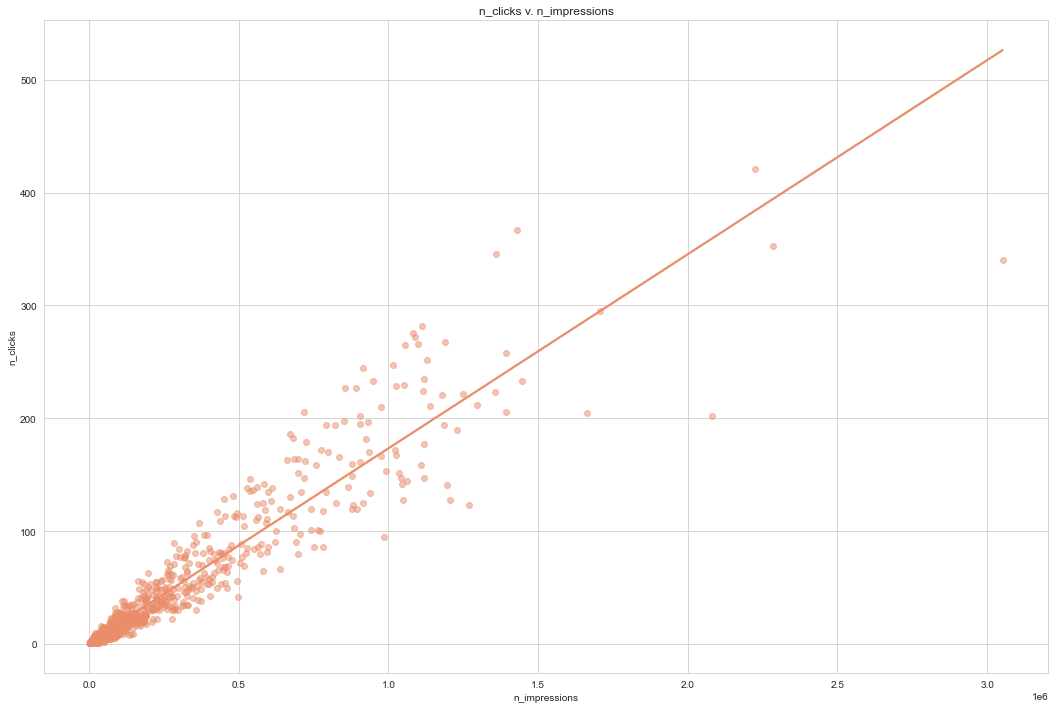
The first step of the digital advertising workflow is this: spending money to buy ads, and counting how many people see them (the “impressions”). The next step is determining how many people click on the advert after seeing it.In this exercise, we’ll do exactly that.
sns.set_palette("flare")
# Plot using the transformed variables
sns.regplot(data=ad_conversion,y='n_clicks', x='n_impressions', scatter_kws=({'alpha':0.5}), ci=None)

plt.title('n_clicks v. n_impressions')
plt.show()

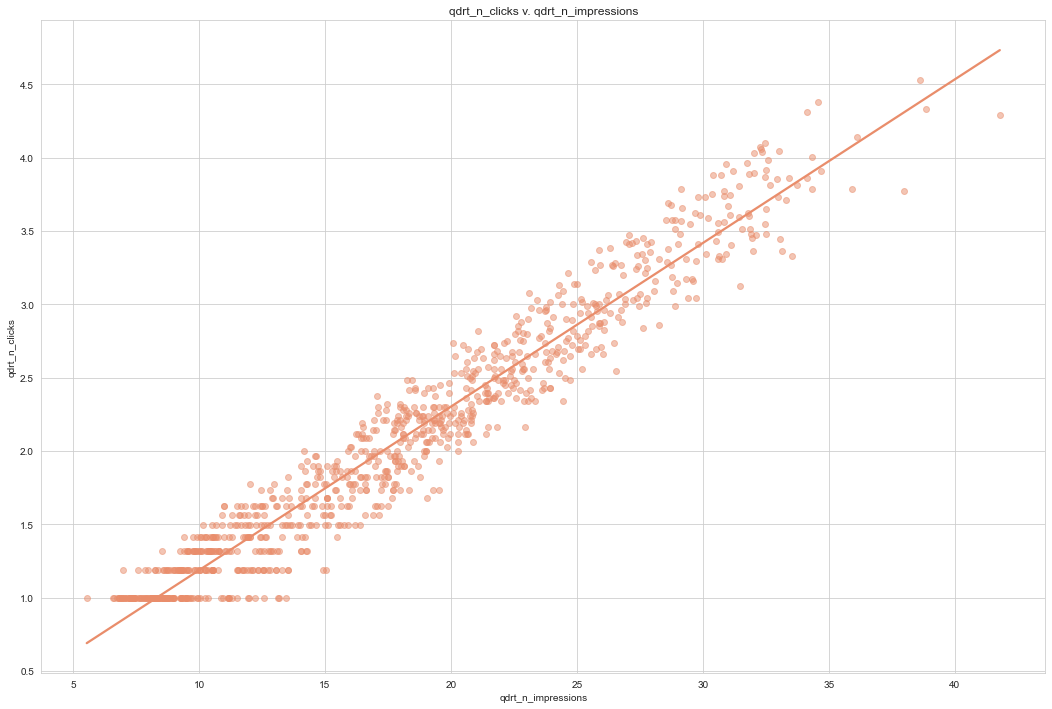
# Create qdrt_n_impressions and qdrt_n_clicks
ad_conversion["qdrt_n_impressions"] = ad_conversion["n_impressions"] ** 0.25

ad_conversion["qdrt_n_clicks"] = ad_conversion["n_clicks"] ** 0.25

plt.figure()

# Plot using the transformed variables
sns.regplot(data=ad_conversion,
            y='qdrt_n_clicks',
            x='qdrt_n_impressions',
            scatter_kws=({'alpha':0.5}),
            ci=None)

plt.title('qdrt_n_clicks v. qdrt_n_impressions')
plt.show()
# Run a linear regression of your transformed variables
mdl_click_vs_impression_trans = ols('qdrt_n_clicks ~ qdrt_n_impressions', data = ad_conversion).fit()

explanatory_data = pd.DataFrame({"qdrt_n_impressions": np.arange(0, 3e6+1, 5e5) ** .25,
                                 "n_impressions": np.arange(0, 3e6+1, 5e5)})


# Complete prediction_data
prediction_data = explanatory_data.assign(
    qdrt_n_clicks = mdl_click_vs_impression_trans.predict(explanatory_data)
)

# Print the result
print(prediction_data)
   qdrt_n_impressions  n_impressions  qdrt_n_clicks
0            0.000000            0.0       0.071748
1           26.591479       500000.0       3.037576
2           31.622777      1000000.0       3.598732
3           34.996355      1500000.0       3.974998
4           37.606031      2000000.0       4.266063
5           39.763536      2500000.0       4.506696
6           41.617915      3000000.0       4.713520
Back transformation
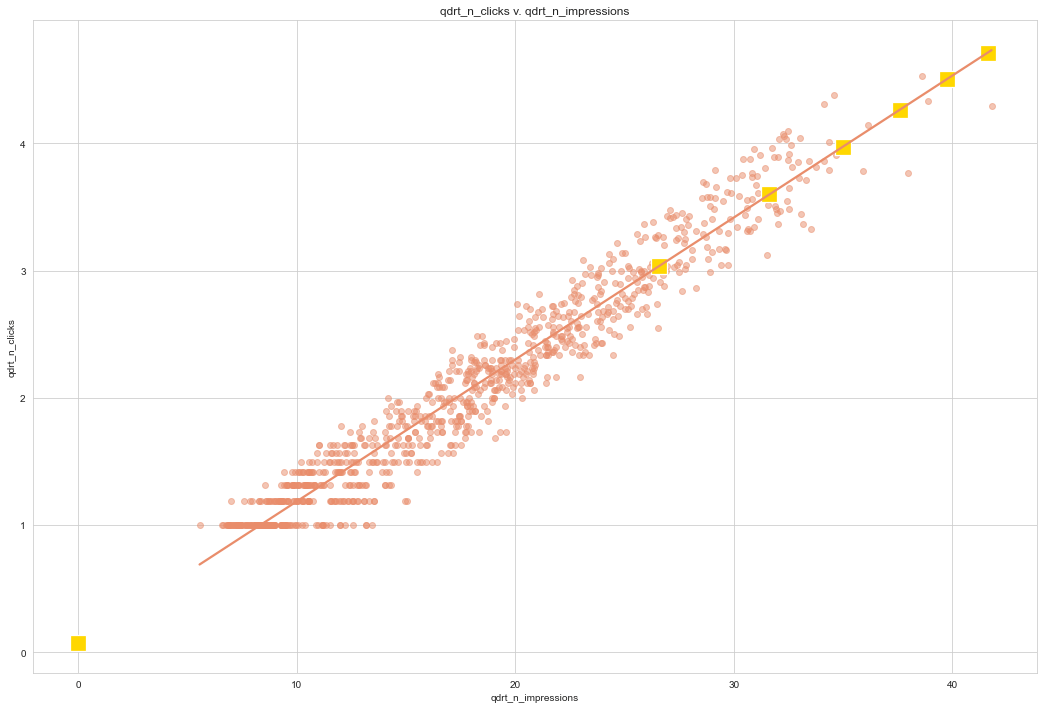
In the previous exercise, we transformed the response variable, ran a regression, and made predictions. But we’re not done yet! In order to correctly interpret and visualize your predictions, we’ll need to do a back-transformation.
# Back transform qdrt_n_clicks
prediction_data["n_clicks"] = prediction_data["qdrt_n_clicks"] ** 4

# Print the result
print(prediction_data)
   qdrt_n_impressions  n_impressions  qdrt_n_clicks    n_clicks
0            0.000000            0.0       0.071748    0.000026
1           26.591479       500000.0       3.037576   85.135121
2           31.622777      1000000.0       3.598732  167.725102
3           34.996355      1500000.0       3.974998  249.659131
4           37.606031      2000000.0       4.266063  331.214159
5           39.763536      2500000.0       4.506696  412.508546
6           41.617915      3000000.0       4.713520  493.607180
# Plot the transformed variables
fig = plt.figure()
sns.regplot(data=ad_conversion,
            y="qdrt_n_clicks",
            x="qdrt_n_impressions",
            ci=None,
            scatter_kws=({'alpha':0.5}))

# Add a layer of your prediction points
sns.scatterplot(data=prediction_data,
                y="qdrt_n_clicks",
                x="qdrt_n_impressions",
                color='gold',
                marker='s',
                s=250)

plt.title('qdrt_n_clicks v. qdrt_n_impressions')

plt.show()
# Plot the transformed variables
fig = plt.figure()
sns.regplot(data=ad_conversion,
            y="n_clicks",
            x="n_impressions",
            ci=None,
            scatter_kws=({'alpha':0.5}))

# Add a layer of your prediction points
sns.scatterplot(data=prediction_data,
                y="n_clicks",
                x="n_impressions",
                color='gold',
                marker='s',
                s=200)

plt.title('qdrt_n_clicks v. qdrt_n_impressions')

plt.show()

Coefficient of determination
The coefficient of determination is a measure of how well the linear regression line fits the observed values. For simple linear regression, it is equal to the square of the correlation between the explanatory and response variables.
Here, we’ll take another look at the second stage of the advertising pipeline: modeling the click response to impressions. Two models are created: mdl_click_vs_impression_orig models n_clicks versus n_impressions. mdl_click_vs_impression_trans models n_clicks to the power of 0.25 versus n_impressions to the power of 0.25.
# Run a linear regression of your transformed variables
mdl_click_vs_impression_orig = ols('n_clicks ~ n_impressions', data = ad_conversion).fit()

# Print a summary of mdl_click_vs_impression_orig
print(mdl_click_vs_impression_orig.summary())
print()

# Print a summary of mdl_click_vs_impression_trans
print(mdl_click_vs_impression_trans.summary())
                            OLS Regression Results
==============================================================================
Dep. Variable:               n_clicks   R-squared:                       0.892
Model:                            OLS   Adj. R-squared:                  0.891
Method:                 Least Squares   F-statistic:                     7683.
Date:                Sat, 29 Jul 2023   Prob (F-statistic):               0.00
Time:                        22:48:03   Log-Likelihood:                -4126.7
No. Observations:                 936   AIC:                             8257.
Df Residuals:                     934   BIC:                             8267.
Df Model:                           1
Covariance Type:            nonrobust
=================================================================================
                    coef    std err          t      P>|t|      [0.025      0.975]
---------------------------------------------------------------------------------
Intercept         1.6829      0.789      2.133      0.033       0.135       3.231
n_impressions     0.0002   1.96e-06     87.654      0.000       0.000       0.000
==============================================================================
Omnibus:                      247.038   Durbin-Watson:                   0.870
Prob(Omnibus):                  0.000   Jarque-Bera (JB):            13215.277
Skew:                          -0.258   Prob(JB):                         0.00
Kurtosis:                      21.401   Cond. No.                     4.88e+05
==============================================================================

Notes:
[1] Standard Errors assume that the covariance matrix of the errors is correctly specified.
[2] The condition number is large, 4.88e+05. This might indicate that there are
strong multicollinearity or other numerical problems.

                            OLS Regression Results
==============================================================================
Dep. Variable:          qdrt_n_clicks   R-squared:                       0.945
Model:                            OLS   Adj. R-squared:                  0.944
Method:                 Least Squares   F-statistic:                 1.590e+04
Date:                Sat, 29 Jul 2023   Prob (F-statistic):               0.00
Time:                        22:48:03   Log-Likelihood:                 193.90
No. Observations:                 936   AIC:                            -383.8
Df Residuals:                     934   BIC:                            -374.1
Df Model:                           1
Covariance Type:            nonrobust
======================================================================================
                         coef    std err          t      P>|t|      [0.025      0.975]
--------------------------------------------------------------------------------------
Intercept              0.0717      0.017      4.171      0.000       0.038       0.106
qdrt_n_impressions     0.1115      0.001    126.108      0.000       0.110       0.113
==============================================================================
Omnibus:                       11.447   Durbin-Watson:                   0.568
Prob(Omnibus):                  0.003   Jarque-Bera (JB):               10.637
Skew:                          -0.216   Prob(JB):                      0.00490
Kurtosis:                       2.707   Cond. No.                         52.1
==============================================================================

Notes:
[1] Standard Errors assume that the covariance matrix of the errors is correctly specified.
# Print the coeff of determination for mdl_click_vs_impression_orig
print(f'The r-squared value for mdl_click_vs_impression_orig is:\n{mdl_click_vs_impression_orig.rsquared}')
print()

# Print the coeff of determination for mdl_click_vs_impression_trans
print(f'The r-squared value for mdl_click_vs_impression_trans is:\n{mdl_click_vs_impression_trans.rsquared}')
The r-squared value for mdl_click_vs_impression_orig is:
0.8916134973508041

The r-squared value for mdl_click_vs_impression_trans is:
0.9445272817143905
mdl_click_vs_impression_orig has a coefficient of determination of 0.89. The number of improessions explains 89% of the variability in the number of clicks.
Additionally, the coefficient of determination suggests that the mdl_click_vs_impression_trans gives a better fit.
Residual standard error
Residual standard error (RSE) is a measure of the typical size of the residuals. Equivalently, it’s a measure of how wrong you can expect predictions to be. Smaller numbers are better, with zero being a perfect fit to the data.
Again, we’ll look at the models from the advertising pipeline, mdl_click_vs_impression_orig and mdl_click_vs_impression_trans.
# Calculate mse_orig for mdl_click_vs_impression_orig
mse_orig = mdl_click_vs_impression_orig.mse_resid #mean standard error
print("MSE of original model: ",mse_orig)

# Calculate rse_orig for mdl_click_vs_impression_orig and print it
rse_orig = np.sqrt(mse_orig)
print("RSE of original model: ", rse_orig)

# Calculate mse_trans for mdl_click_vs_impression_trans
mse_trans = mdl_click_vs_impression_trans.mse_resid #mean standard error
print("MSE of transformed model: ",mse_trans)

# Calculate rse_trans for mdl_click_vs_impression_trans and print it
rse_trans = np.sqrt(mse_trans)
print("RSE of transformed model: ", rse_trans)
MSE of original model:  396.2424208189449
RSE of original model:  19.905838862478138
MSE of transformed model:  0.038772133892971475
RSE of transformed model:  0.19690640896875722
The difference between the predicted clicks and acutal clicks is typically 19.9 clicks.
The difference between the predicted clicks ^0.25 and acutal clicks ^0.25 is typically .02 clicks ^0.25.
RSE is a measure of accuracy for regression models. It even works on other other statistical model types like regression trees, so you can compare accuracy across different classes of models.
If a linear regression model is a good fit, then the residuals are approximately normally distributed, with mean zero.
 My Data Was A Miner